Payments API v.3
The Payments v.3 API endpoints are in beta and may change as we enhance the product.
Payments API v.3 is BVNK's unified solution for sending and receiving payments. Both crypto and fiat payouts use the /payment/v3/payouts endpoint, while stablecoin payment links use /payment/v3/payins. Each payment includes an originator, a beneficiary, an optional display currency, an embedded quote, a single status model, and one webhook per resource. Internal Transfers v.3 uses the same structure.
This page outlines the core concepts used in the v.3 guides. To begin integration, refer to:
- Send stablecoin payouts: send crypto from your wallet, in one call or through a quote.
- Send fiat payouts: send fiat through the same endpoint.
- Receive stablecoins via Payment Links: collect crypto from your customers.
If you currently use the v.1 crypto or v.2 fiat endpoints, see Migrate crypto payments from v.1 or Migrate fiat payments from v.2.
For who is this product intended?
Payments API v.3 is intended for regulated financial institutions and similar businesses that need to manage payments for themselves and their customers. BVNK streamlines this process and provides tools to efficiently manage funds between your business, your customers, and their end-customers. It is best suited for:
- Payment Service Providers (PSPs), neobanks, and enterprises: offer stablecoin payouts to your customers and their end-users while maintaining only a pre-funded fiat balance. BVNK handles the conversion and transfer, so you can extend your services without managing stablecoin wallets or crypto infrastructure.
- Trading platforms and CFD or FX brokers: let your users withdraw their balances in stablecoins as an alternative to your existing payout options.
- Gaming platforms: pay out your users' winnings and in-game sales directly to their crypto wallets.
- Businesses paying employees, contractors, and suppliers: send salaries and supplier payments in stablecoins or fiat through the same endpoint.
- Businesses that pay out over local banking networks: send payouts in local currencies, such as BRL, MXN, and PHP, over domestic networks instead of SWIFT, without creating a virtual account first. See Payments via local banking networks.
Key concepts
Originator and beneficiary
Every v.3 payment has an originator, who the money comes from, and a beneficiary, who the money goes to. You never send a direction. It follows from the endpoint you call:
- Payouts: on
POST /payment/v3/payouts, you are the originator, your wallet is debited, and your payee is the beneficiary. - Payins: on
POST /payment/v3/payins, your customer is the originator and pays, and you are the beneficiary, whose wallet is credited.
Responses still return the direction as direction: OUT on payouts and IN on payins.
walletId is under originator for payouts and under beneficiary for payins. Confirm your role before reusing a payout code for payins.
Currency types
A v.3 payment can specify up to three currencies:
- Originator currency (
originator.currency): the funding side. On a payout, this is your wallet's currency, derived fromoriginator.walletId. - Beneficiary currency (
beneficiary.currency): the receiving side, what your payee actually gets. - Display currency (
checkout.currency): optional. What the payment is worth, in any currency, including ones BVNK does not settle in. BVNK calculates backwards from it to the debit and forwards to the credit.
For example, if you need to pay Phoebe 10,000 ZAR and ZAR is not a settlement currency, ZAR becomes the display currency. BVNK debits your EUR wallet and credits Phoebe after she selects a currency, resulting in three currencies and two conversions.
On a payin, if you request 1,000 ZAR and your customer selects USDC, BVNK calculates the USDC amount they must send. Once the funds arrive, BVNK converts them into your wallet currency: no conversion if your wallet holds USDC, or a second conversion if it holds EUR.
Amounts
When making a request, specify an amount for only one of the three currencies. BVNK will derive the other two. There is no selection flag; BVNK infers the anchor currency from the provided amount:
originator.amount: fixes the debit. BVNK takes exactly this much from your wallet, and your payee's amount moves with the rate.beneficiary.amount: fixes the credit. Your payee receives exactly this much, and your cost moves with the rate.checkout.amount: fixes the display value, for example a payment worth 10,000 ZAR. Both other amounts are derived.
The amount you set stays fixed, and the other two are recalculated each time the payment is repriced. You can switch the anchor on a PATCH, for example from fixed debit to fixed credit, by setting the other side's amount.
Responses and webhooks return every amount that can change in two versions, each a {currency, amount} object:
required: onoriginator,beneficiary, andcheckout, and on a payout'sfees.customerFee, what was asked for. The amount you set on the request comes back here.estimated: onfees.processingFeeandfees.networkFee, and on a payin'sfees.customerFee, the fee as quoted.actual: on all of them, what actually moved.
Both versions are always present, even when they match. On payouts, actual is always an object: originator.actual shows the debit from your wallet as soon as the quote is accepted, and every other actual has an amount of 0.00 until the payout reaches COMPLETED. On payins, actual is null until PROCESSING. A FAILED payment keeps any actual it already had, and its status shows the failure.
{
    "status": "COMPLETED",
    "fees": {
        "customerFee": null,
        "processingFee": { "estimated": { "currency": "EUR", "amount": "0.09" }, "actual": { "currency": "EUR", "amount": "0.09" } },
        "networkFee": { "estimated": { "currency": "EUR", "amount": "1.00" }, "actual": { "currency": "EUR", "amount": "1.00" } }
    },
    "originator": {
        "required": { "currency": "EUR", "amount": "9.21" },
        "actual": { "currency": "EUR", "amount": "9.21" },
        "walletId": "a:25022613287255:zmHs0pg:1"
    },
    "beneficiary": {
        "required": { "currency": "USDT", "amount": "9.997368" },
        "actual": { "currency": "USDT", "amount": "9.997368" }
    },
    "checkout": {
        "required": { "currency": "USD", "amount": "10" },
        "actual": { "currency": "USD", "amount": "10" }
    }
}
Compare required and actual to identify discrepancies. For example, in an overpaid payin, originator.actual.amount exceeds originator.required.amount. If a customer sends a different coin than requested, required reflects the requested coin and actual shows the received coin. Amounts that do not change use a simple currency and amount format, such as conversion.spread, trackingDetails[], and instructions[].
Quotes and conversion
When a payment involves currency conversion, pricing details are included in the conversion object within the payment. There is no separate quote resource:
conversion.type:QUOTEwhen the payment is priced from a quote. A payout you send with all its details is also aQUOTE: BVNK accepts it for you at the current rate.AUTO_CONVERSIONwhen BVNK converts the funds without a quote.conversion.baseRate: the mid-market rate before spread.conversion.allInRate: the rate applied to the payment, including spread.conversion.spread: the spread itself, as a percentage and an amount.conversion.validityDurationandconversion.expiresAt: how long a payout quote can still be accepted.conversion.expiresAtmatches the payout's ownexpiresAt, set byexpiryDuration. Accepting or refreshing a quote after it fails.conversion.priceLockDurationandconversion.priceLockExpiresAt: how long the quoted rate stays locked, 30 seconds from each pricing.conversion.digest: a fingerprint of the quoted price, issued each time the quote is priced. Pass it back when you refresh a quote.
conversion is omitted if pricing is not yet possible, such as when a payout is created without a destination currency.
What you send decides what happens
POST /payment/v3/payouts does not use a quote-only or send-now flag. The outcome depends on the completeness of your request:
- No destination currency: BVNK creates an unpriced payout at
PENDING_QUOTE_ACCEPTANCEand returnscheckout.currencyOptions[]for your payee to choose from. - Destination currency and network, but no address: BVNK returns a priced quote at
PENDING_QUOTE_ACCEPTANCE. It cannot be sent yet. - Everything, including the crypto address or bank account: BVNK creates the payout, accepts the quote for you, and sends it. The payout moves to
PROCESSING, or toPENDING_APPROVALif your account requires approvals. - Everything, plus
"confirmationRequired": true: BVNK prices the payout, accepts the quote, and holds it atPENDING_VERIFICATIONuntil your customer confirms it.
Omitting the destination address or bank account keeps a payout as a quote. Including one initiates a live fund transfer.
For a worked example of each, see Send stablecoin payouts.
Labels and related payments
Two fields indicate why a payment is exceptional and link it to its counterpart:
labels[]: classifies the payment.OVER,UNDER, orLATEon a payin that did not arrive as expected, andREFUNDon a payout created to correct one. Empty on an ordinary payment.relatedPayments[]: links a payment to its counterpart, as{type, paymentId}entries.
For example, a payin asks for 50 USDC, and your customer sends 60. BVNK completes the payin with labels: ["OVER"] and, if auto refund is configured, creates a payout for the 10 USDC difference. The payin's relatedPayments[] points forward to that payout, and the payout carries labels: ["REFUND"] and points back to the payin. See Handle overpayments.
Travel Rule (EU crypto only)
v.3 includes Travel Rule data in the entity field. INDIVIDUAL originators on payins must provide either Pair A (placeOfBirth) or Pair B (identification[] and a full address), but not both. COMPANY entities may include an optional legalEntityIdentifier, and COMPANY originators must provide a full address. Responses return the data provided. The US does not have an equivalent requirement.
Identifiers ending with Reference are user-supplied, while those ending with Id are issued by BVNK. For example, you provide customerReference and reference, while BVNK provides customerId, id, contactId, and paymentId. This convention applies to all identifiers in the API.
Payment methods
Three values define how a v.3 payment is processed:
method:CRYPTOorFIAT. Returned on responses and webhooks so that you can query and filter payments by method. Never sent on requests: on a payout, BVNK infers it frombeneficiary.paymentInstrument.type.paymentInstrument.type: the kind of instrument the money is paid to or from.CRYPTO_ADDRESSfor an on-chain address, andBANK_ADDRESSfor a bank account on a fiat payout.paymentInstrument.network: for crypto, the chain name, for exampleETHEREUM,TRON,SOLANA,POLYGON, orBSC. Always a chain, never a token standard such asERC20. Networks such as XRP and Stellar also needpaymentInstrument.tag. For the currencies available on each network, see Crypto protocols and networks.
For crypto, paymentInstrument accepts a single write-only address in requests. Responses return a read-only addresses[]: for a payout's beneficiary, this is the destination address; for a payin's originator, it includes all addresses your customer used. For payins, available networks appear in instructions[], with one entry per network. On payouts, instructions[] is always empty.
For a bank account, paymentInstrument carries accountNumber, the write-only accountNumberFormat, accountType, and bank, with the bank's bic, national identifier nid, and address. SWIFT payouts can add intermediaryBanks[]. See Send fiat payouts.
For fiat, the bank payment schemes BVNK supports, such as SEPA_CT, ACH, and FASTER_PAYMENT, are listed in Payment schemes. How a v.3 fiat payout selects a scheme is not specified yet.
Payments via local banking networks
Previously, withdrawing in an emerging market currency required creating a virtual account and using its vIBAN. Now, POST /payment/v3/payouts enables direct payouts in emerging market currencies (BRL, MXN, ARS, CAD, COP, CLP, PHP, and KRW) over local banking networks, just like USD, EUR, and GBP. No virtual account is needed. Set beneficiary.currency to the local market currency, and BVNK will route the payout through the domestic network instead of SWIFT. See Fiat payout networks for delivery times and cut-offs.
Payment statuses
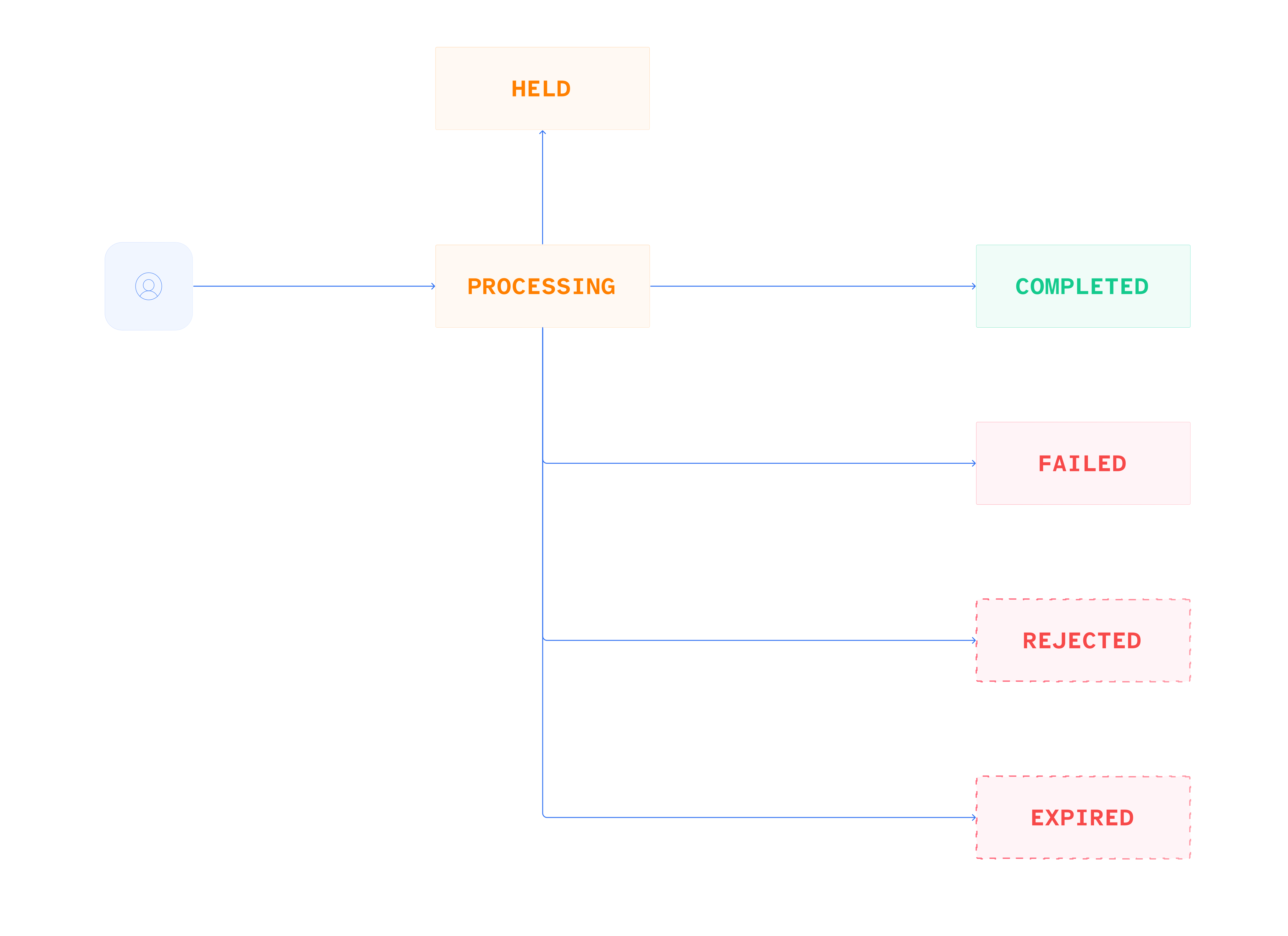
Payouts and payins use a unified status model. Some statuses are conditional and appear only if the relevant step applies to your account or payment. A payout that does not require a quote, verification, or approval proceeds directly to PROCESSING. In the diagrams below, conditional statuses are shown as dashed boxes.
- All payout statuses
- Crypto: with a quote or details
- Crypto: pending verification or without details

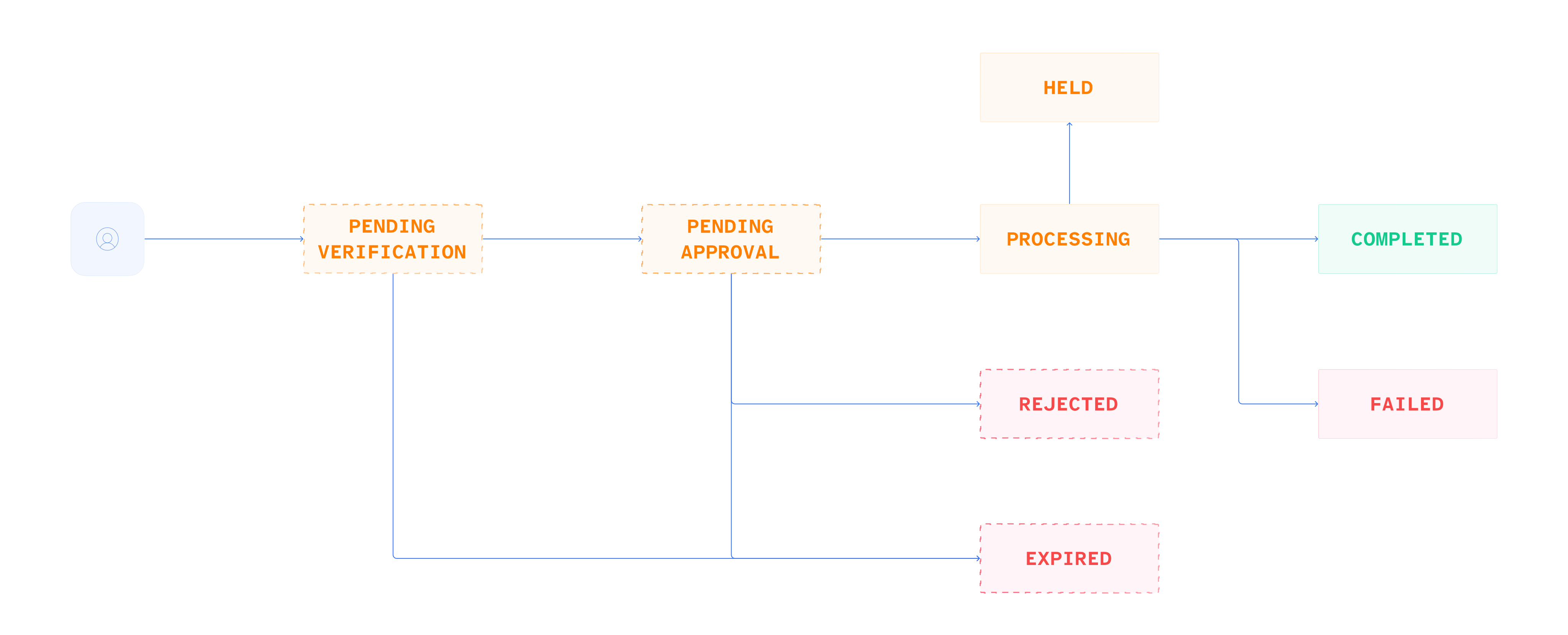
Payins share most of these statuses and add two of their own. The table covers both:
| Status | Payouts | Payins | Meaning |
|---|---|---|---|
PENDING_QUOTE_ACCEPTANCE (conditional) | ✅ | ✅ | Your customer has yet to accept a quote, or a payout was created without a destination currency and no quote has been priced yet. |
PENDING_VERIFICATION (conditional) | ✅ | ✅ | The payment is fully priced with the rate locked, waiting for your customer to confirm it. |
PENDING_APPROVAL (conditional) | ✅ | ❌ | A member of your team must approve the payout before it proceeds. Payouts only. |
PENDING_CUSTOMER_PAYMENT | ❌ | ✅ | The payin is priced, and your customer has not yet sent the funds. |
PENDING_INFO (conditional) | ❌ | ✅ | BVNK needs more information before the payment can be released. Shown only if a Request for Information is triggered. |
PROCESSING | ✅ | ✅ | The payment is processing. |
HELD | ✅ | ✅ | The payment is held for compliance reasons. Reversible: a held payment can return to PROCESSING. |
COMPLETED | ✅ | ✅ | The payment has completed. Terminal on pay-ins and on payouts unless the funds are later returned. |
REJECTED | ✅ | ❌ | A gate declined the payout, reached from PENDING_APPROVAL or PENDING_VERIFICATION, never from PROCESSING. Not retryable: create a new payout. |
FAILED | ✅ | ✅ | The payment was attempted from PROCESSING and did not succeed. |
EXPIRED | ✅ | ✅ | The payment or an approval expired. For a payment, your customer did not act on it in time. On an approval, your team did not approve it within the seven-day window. A late payin can still move on from EXPIRED to PROCESSING and COMPLETED, with labels: ["LATE"]. |
PENDING_RECALL (conditional) | ✅ | ❌ | Fiat payouts only. A recall has been requested on a payout that is already in flight, reached from PROCESSING. |
RECALL_REJECTED (conditional) | ✅ | ❌ | Fiat payouts only. Terminal. The recall was declined, and the payout stands. |
RETURNED (conditional) | ✅ | ❌ | Fiat payouts only. Terminal. The funds came back, either because a recall succeeded or because the destination returned them after the payout completed. |
Each payment also returns statusHistory[], an array of {status, timestamp} entries. Use this to review the complete progression of a payment, rather than relying solely on the current status.
Webhooks
v.3 sends a single status-change event per resource. Use status to determine what occurred and labels[] to understand why a payment is unusual, rather than relying on event names:
payment:v3:payout:status-change: every payout transition, including refunds, which are payouts withlabels: ["REFUND"].payment:v3:payin:status-change: every payin transition, including overpaid, underpaid, late, and held payins.
Full event schemas and example payloads are in the Payments v.3 webhooks reference.