Create individual customers
This guide describes how to create and onboard individual customers (natural persons).
This is a new customer onboarding flow, which is recommended for all new integrations.
If you already have an existing integration with Customers API v.1, you can continue using it. BVNK will continue to support this API v.1 going forward.
The onboarding flow is asynchronous: after you create a customer, BVNK processes the application and notifies you via webhooks when action is required or when verification is complete. There is no separate "submit" call: onboarding moves to review automatically once all the required data, documents, and agreements are in place.
The data and documents you must submit depend on the onboarding model, the customer's country of residence, and the BVNK entity (US or EU) your account is assigned to. See the compliance requirements for individuals for the full list.
Individual customer creation and onboarding is only available for the embedded delivery model. The specific data and document requirements depend on the onboarding model:
- BVNK-Managed: You submit the customer's personal and due diligence data, and BVNK verifies the customer's identity. The customer's identity documents and selfie are collected through the API or BVNK's hosted onboarding flow. Recommended when you don't have an existing KYC programme or want BVNK to handle the full verification lifecycle.
- Partner-Managed: Available to regulated partners with an appropriate AML programme. You verify the customer's identity with your own processes and share the verification results with BVNK in the
relianceobject, along with a risk score and EDD attestation. No identity documents, selfies, or proofs of address are uploaded at creation. To learn more, contact your BVNK account manager.
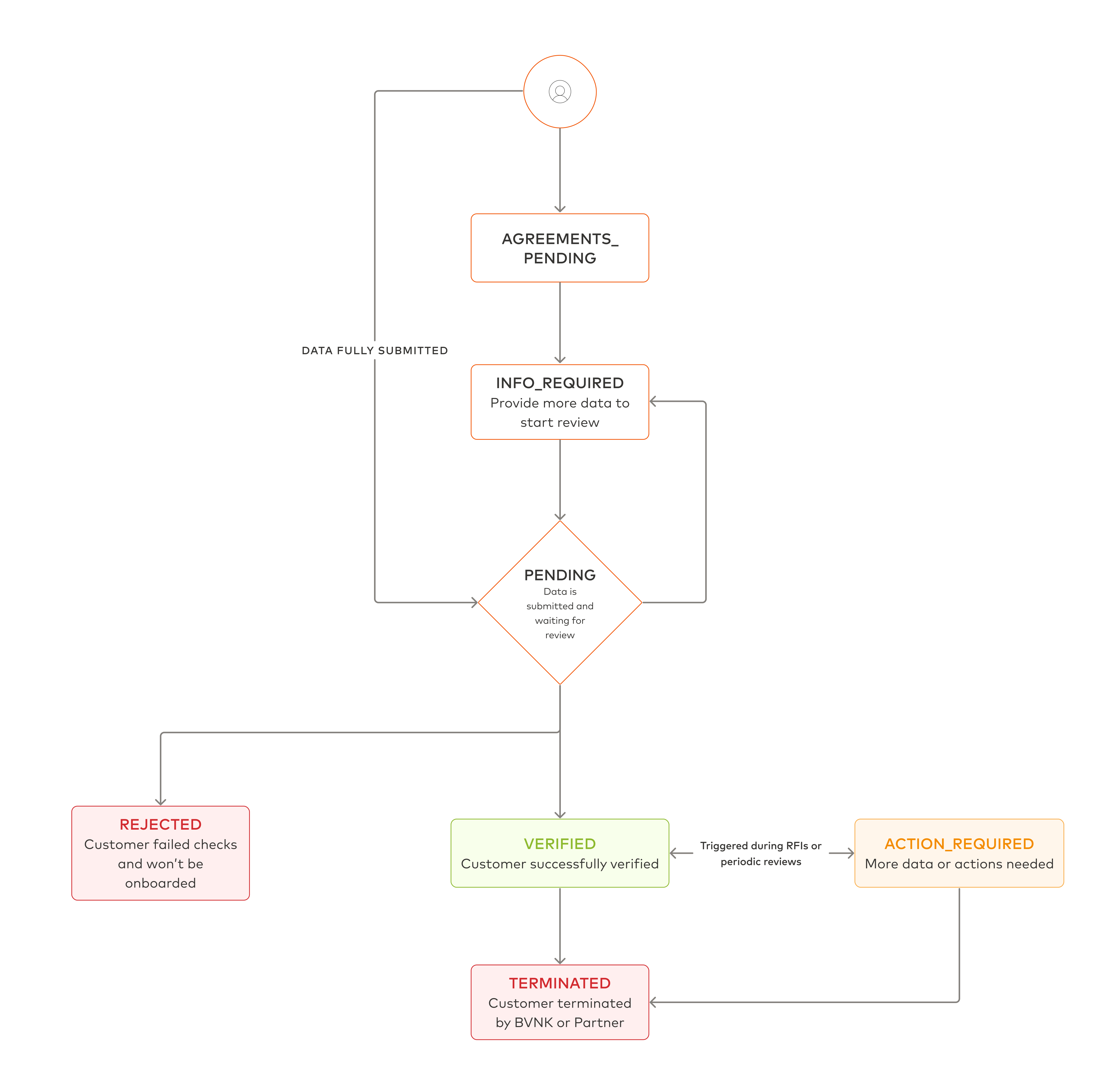
When onboarding a customer, they pass through the following statuses:
| Status | Description |
|---|---|
AGREEMENTS_PENDING | The customer was created through agreements and the agreements are not signed yet. |
INFO_REQUIRED | Customer data, documents, or agreements are still missing. Check requiredActions. |
PENDING | All information is submitted and the customer is under review. |
ACTIONS_REQUIRED | BVNK needs additional information during or after the review. Check requiredActions. |
VERIFIED | The customer is verified. |
REJECTED | The customer failed verification. |
TERMINATED | The customer was offboarded by BVNK or by you. |
A typical customer moves from INFO_REQUIRED to PENDING and then to VERIFIED or REJECTED. During or after the review, BVNK may request more information, in which case the customer moves to ACTIONS_REQUIRED until you provide it. A verified customer can also move back to ACTIONS_REQUIRED or PENDING, for example, during a periodic review.
Prerequisites
Before you start, make sure you have:
- A BVNK account with Embedded Partner capabilities enabled for individual customers. If your account is not enabled for individual customers, the API returns
403. - API keys generated via the BVNK Portal.
- Webhook endpoint configured to receive status change events from BVNK.
- Familiarity with BVNK's compliance requirements for individual customers.
Before running the onboarding flow, make sure you are not onboarding customers from restricted jurisdictions, and that your platform has collected all required KYC, screening, and risk assessment data. For more information, see BVNK Acceptable Use Policy.
Create agreements
The customer must accept BVNK's agreements before onboarding can proceed. We recommend collecting the agreements before creating the customer, for example, during your sign-up flow.
-
Create the agreements for the prospective customer by sending the
POST platform/v2/agreementsrequest with"customerType": "INDIVIDUAL".Supply a
referencethat is unique within your account (up to 36 characters). You will reuse it to respond to the agreements and to create the customer later.- BVNK-Managed
- Partner-Managed
{"reference": "partner-ind-001","useCase": "EMBEDDED_FIAT_ACCOUNTS","customerType": "INDIVIDUAL","countryCode": "DE","customerName": "Jane Mueller","applicantEmail": "jane.mueller@example.com"}The response returns the agreements that apply to the customer, each in the
PENDINGstatus, and asigningUrl:{"id": "5f2d9c1a-7b3e-4e8a-a1c4-0d6e8f9b2a37","reference": "partner-ind-001","agreements": [{"id": "c2cbc333-8c4c-4bd7-a3d3-92a377772cbb","name": "Partner Platform Agreement (Non-US)","description": "Terms and conditions for Partner Platform customers outside the US","declinable": false,"status": "PENDING"}],"signingUrl": "https://onboarding.layer1.com#token=jgeTw5WhqzDdnaRUqLxyYdb5XJ4QqvK-4OENqPgjFKc&userId=fb870b23-17a8-4cd7-bc00-7eadc6b07561"}At this point, the customer record exists with the
AGREEMENTS_PENDINGstatus. -
Collect the customer's decisions in one of the following ways:
-
Hosted signing: Redirect the customer to the
signingUrl. The customer reviews and signs the agreements in BVNK's hosted interface. To send the customer back to your platform after signing, append aredirectUriparameter as described in Create business customers. -
Your own interface: Show the agreements to the customer. Use
GET platform/v2/agreements/{id}/contentto get a download link for each agreement. Then submit the customer's decisions by sending thePOST platform/v2/agreements/actionsrequest with the samereference:{"reference": "partner-ind-001","actions": [{"agreementId": "c2cbc333-8c4c-4bd7-a3d3-92a377772cbb","type": "ACCEPT"}]}
Once the agreements are signed, the customer moves to
INFO_REQUIRED. -
-
Create the customer with the same
reference. The signed agreements are bound to the customer automatically. If the agreements are still pending, or a non-declinable agreement was rejected, the request is rejected with400.
Create individual customers
After the relevant agreements are accepted, create a customer.
- BVNK-Managed
- Partner-Managed
-
Create the customer by sending the
POST platform/v2/customersrequest with theindividualobject. Thecompanyandindividualobjects are mutually exclusive, so don't includecompanyin the same request.{"useCase": "EMBEDDED_FIAT_ACCOUNTS","reference": "partner-ind-001","individual": {"firstName": "Jane","lastName": "Mueller","emailAddress": "jane.mueller@example.com","phoneNumber": "+49301234567","dateOfBirth": "1990-06-15","placeOfBirth": "Berlin","birthCountryCode": "DE","nationality": "DE","address": {"addressLine1": "Unter den Linden 77","city": "Berlin","postalCode": "10117","countryCode": "DE"},"taxIdentification": {"number": "21/815/09150","taxResidenceCountryCode": "DE"},"cdd": {"employmentStatus": "SALARIED","sourceOfFunds": "SALARY","pepStatus": "NOT_PEP","intendedUseOfAccount": "TRANSFERS_OWN_WALLET","expectedMonthlyVolume": {"amount": 5000,"currency": "EUR"}}}}Note the following jurisdiction-specific requirements:
- EEA customers:
nationality,birthCountryCode, andcdd.expectedMonthlyVolumeare required. - US persons (US nationality or US tax residence):
taxIdentification.numbermust be a valid SSN or ITIN, andaddress.stateCodeis required for US addresses. Residents of some US states must also providecdd.estimatedYearlyIncomeandcdd.employmentIndustrySector.
The response returns the customer's
idand currentstatus. Save theidfor the subsequent steps.{"id": "8d3f2a71-5c1e-4b9a-9f0d-2e6b7c4a1d95","reference": "partner-ind-001","status": "INFO_REQUIRED","type": "INDIVIDUAL","useCase": "EMBEDDED_FIAT_ACCOUNTS","name": "Jane Mueller","createdAt": "2026-04-22T10:57:35.056865Z","updatedAt": "2026-04-22T10:57:35.056865Z"} - EEA customers:
-
Retrieve the customer's outstanding requirements by sending the
GET platform/v2/customers/{id}request. TherequiredActionsarray lists everything that is still needed before the customer can move to review. See Resolve required actions.{"id": "8d3f2a71-5c1e-4b9a-9f0d-2e6b7c4a1d95","reference": "partner-ind-001","status": "INFO_REQUIRED","type": "INDIVIDUAL","name": "Jane Mueller","authenticatedLink": {"link": "https://onboarding.bvnk.com/link/eyJhbGciOi...","expiresAt": "2026-04-22T11:57:35.056865Z"},"requiredActions": [{"type": "DATA","code": "IDENTITY","category": "DOCUMENT_REQUIREMENTS","description": "Identity document and selfie are required.","status": "REQUIRED"}]} -
Upload the customer's identity documents by sending the
POST platform/v2/customers/{customerId}/documentsrequest asmultipart/form-data.The
metadatapart is a JSON array with one entry per file in thefilespart, in the same order. You can upload up to three documents in one request. For each individual document:countryCode(the country that issued the document) is required.- For two-sided documents (
ID_CARD,DRIVERS,RESIDENCE_PERMIT), upload each side as a separate file withsubTypeset toFRONT_SIDEorBACK_SIDE. - Always include a
SELFIEwith the identity document.
curl -X POST "https://api.sandbox.bvnk.com/platform/v2/customers/8d3f2a71-5c1e-4b9a-9f0d-2e6b7c4a1d95/documents" \-H "Authorization: Bearer <token>" \-F 'metadata=[{"type": "ID_CARD", "subType": "FRONT_SIDE", "filename": "id-front.jpg", "countryCode": "DE"},{"type": "ID_CARD", "subType": "BACK_SIDE", "filename": "id-back.jpg", "countryCode": "DE"},{"type": "SELFIE", "filename": "selfie.jpg", "countryCode": "DE"}];type=application/json' \-F "files=@id-front.jpg" \-F "files=@id-back.jpg" \-F "files=@selfie.jpg"In the response, you will see the documents accepted for processing:
{"id": "9b0c4f1d-7aa2-4c7e-8d55-f8b4a1d6c210","customerId": "8d3f2a71-5c1e-4b9a-9f0d-2e6b7c4a1d95","totalDocuments": 3,"successCount": 3,"failureCount": 0,"documents": [{"documentId": "b8f8a6b5-8f44-4b7c-8d1e-4a6a5a9b4a21","type": "ID_CARD","filename": "id-front.jpg","status": "STORED","uploadedAt": "2026-04-22T10:58:35.056865Z"}],"createdAt": "2026-04-22T10:58:35.056865Z"}For the accepted document types and quality requirements, see Required documents.
Hosted onboardingInstead of collecting documents in your own interface, you can redirect the customer to the
authenticatedLink.linkreturned for the customer. The customer completes the outstanding steps in BVNK's hosted interface. The link expires atauthenticatedLink.expiresAt. -
If BVNK cannot verify the customer's address automatically, a proof-of-address document is requested in
requiredActions. Upload it to the same endpoint withtypeset toUTILITY_BILLorBANK_STATEMENT. For details, see Address verification. -
Wait for the webhook or poll the status by sending the
GET platform/v2/customers/{id}request. Once all requirements are met, the customer moves toPENDINGand then toVERIFIEDorREJECTED.
Resolve required actions
While a customer is in the INFO_REQUIRED or ACTIONS_REQUIRED status, the requiredActions array of GET platform/v2/customers/{id} lists what is still needed. Each action has the following fields:
| Field | Description |
|---|---|
type | DATA: information, a document, or an agreement response is missing. USER_ROLE: an action is required from a specific user role. BLOCKER: BVNK must complete an internal step, such as a manual review; no action is required from you. |
code | Machine-readable identifier of the action. |
category | Area the action belongs to, for example DOCUMENT_REQUIREMENTS or AGREEMENTS. Present only for DATA actions. |
status | REQUIRED if the action is outstanding, or PROCESSING if you have submitted the information and it is being processed. Present only for DATA actions. |
target | The specific item the action refers to, when available. |
The target.kind field tells you how to resolve the action:
target.kind | How to resolve |
|---|---|
DOCUMENT | Upload one of the document types listed in target.types to POST platform/v2/customers/{customerId}/documents. |
AGREEMENT | Have the customer accept the agreement identified by target.assignedAgreementId. |
FIELD | Provide or correct the field at target.path by updating the customer. |
Update customer details
To correct or complete the customer's data, see Update customer details.
Document rejection and resubmission
When BVNK declines a document, you receive a platform:accounts:customer:document-status-change webhook with the document's status set to DECLINED. The customer's requiredActions then lists the documents that are still needed, as actions with target.kind set to DOCUMENT (see Resolve required actions).
To resubmit, upload a new document of one of the target.types to POST platform/v2/customers/{customerId}/documents.
Webhooks
Webhooks must be used as the primary mechanism for tracking status changes. Use polling only as a fallback.
To receive updates on each step of the onboarding process, configure your webhook endpoint in the BVNK Portal. BVNK sends notifications for key lifecycle events.
| Event URN | Trigger |
|---|---|
platform:accounts:customer:status-change | Customer's onboarding status changes. |
platform:accounts:customer:agreement-status-change | Agreement is accepted or rejected by the customer. |
platform:accounts:customer:document-status-change | Status of one or more of the customer's documents changes. |
Use platform:accounts:customer:status-change as the primary driver for your onboarding flow. When you receive a status change, call GET platform/v2/customers/{id} to retrieve the current status and requiredActions.
Error handling
| Scenario | Response status code | Resolution |
|---|---|---|
| Missing required field or invalid value | 400 | Check details.errors for the field paths and messages. |
| Missing jurisdiction-specific field | 400 | EEA customers need nationality, birthCountryCode, and cdd.expectedMonthlyVolume. US persons need a valid SSN or ITIN in taxIdentification.number and address.stateCode. |
| Account not enabled for the customer type or use case | 403 | Contact BVNK to enable individual customers for your account. |
| Reference already bound or idempotency conflict | 409 | Reuse the same payload for the same idempotency key and ensure the reference is not already attached to another customer. |
| Onboarding request rejected | 422 | Check the error message, correct the request, and resubmit. |
| Onboarding temporarily unavailable | 502 | Retry with the same Idempotency-Key. |