Receive fiat pay-ins
BVNK virtual accounts accept fiat pay-ins in EUR, GBP, and USD across a range of payment rails, including SWIFT, SEPA, ACH, Faster Payments, and others. For the full list of supported methods, see Payment methods.
If your counterparties already have your virtual account banking details, no further setup is required. When a pay-in is received, BVNK credits the funds and sends a Fiat pay-in status change webhook with COMPLETED status. Subscribe to this webhook to process incoming payments automatically.
The following sections explain how to retrieve and share your SWIFT deposit details with senders who do not have them.
Prerequisites
Before depositing funds, ensure you have the following:
- A fiat wallet with the SWIFT payment method enabled. See Set up wallets.
- A registered bank account on your BVNK Settings page (for Portal deposits).
Request deposit details
Each wallet is issued with unique SWIFT account details in your business name. Senders transfer funds directly to the account number; no payment reference is required.
Retrieve deposit details via the API or BVNK Portal to share with the sender.
- API
- Portal
-
Send the
GET ledger/v2/wallets/{id}request.{"id": "a:25060945127830:rTgK3wN:1","name": "USD SWIFT","status": "ACTIVE","balance": {"amount": 0.00,"currency": "USD"},"paymentInstruments": [{"type": "FIAT","accountHolderName": "Greenfield Logistics Ltd","accountNumber": "846203917458","bankDetails": {"name": "Atlantic Federal Bank","bic": "ATFEUS33","nid": {"value": "021000021","type": "ROUTING_NUMBER"}}}],"createdAt": "2025-06-09T14:05:12.830Z","updatedAt": "2025-06-09T14:05:17.384Z"} -
In the response, locate the
paymentInstrumentsarray and extract these fields:accountHolderNameaccountNumberbankDetails.bic
Provide payment instructions to senders
Share these details with anyone sending funds to your wallet:
| Parameter | API field name | Description |
|---|---|---|
| Beneficiary name | accountHolderName | The name of the account holder for the BVNK SWIFT account. |
| Account number | accountNumber | The IBAN or account number for the BVNK SWIFT account. |
| Bank code | bankDetails.bic | The bank identifier code for the receiving bank. |
Receive funds via SWIFT
If your wallet uses a pooled SWIFT account, multiple wallets share a single bank account issued under the BVNK-owned legal entity. BVNK uses the remittanceInformationPrefix to identify which wallet each incoming payment belongs to. This reference is unique to your wallet and is required for transaction reconciliation.
When you receive a SWIFT pay-in to a pooled account, the process is as follows:
- The sender initiates a payment from their bank to the BVNK pooled SWIFT account, including the
remittanceInformationPrefixas the payment reference. - BVNK receives the payment and matches it to your wallet using the reference.
- BVNK credits the funds to your wallet.
If the payment reference is missing or incorrect, BVNK cannot automatically match the payment. In this case, provide proof of payment, such as a bank statement or transfer confirmation, so BVNK can manually credit your wallet. This may delay the availability of your funds.
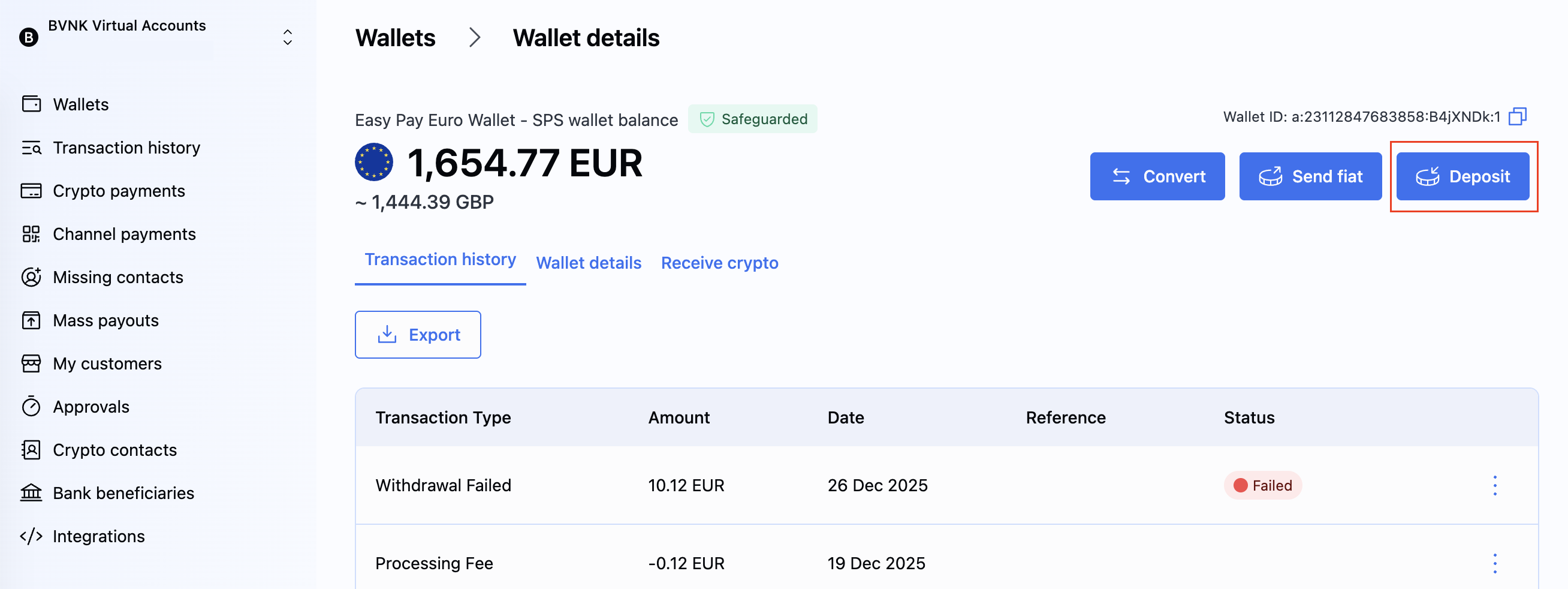
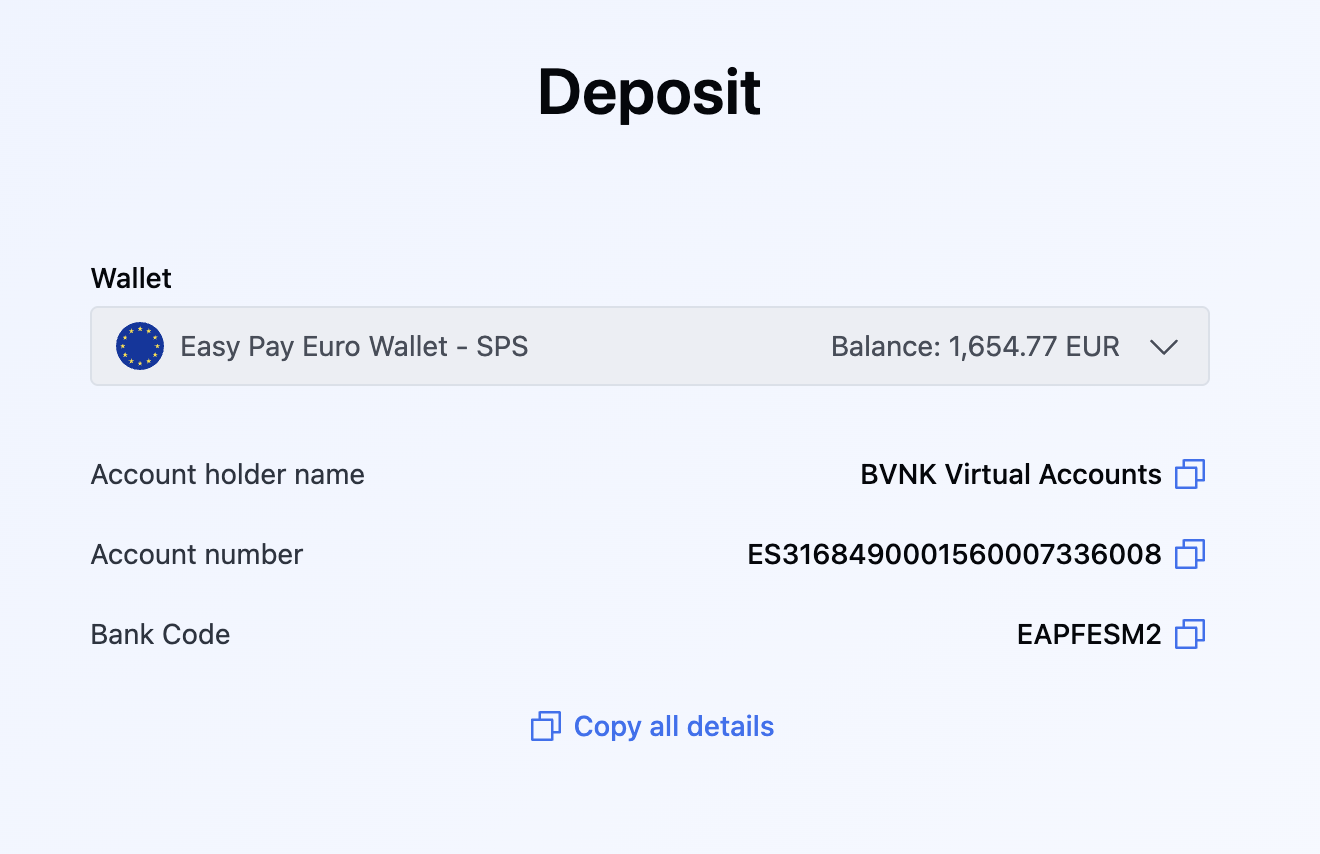
Retrieve the remittanceInformationPrefix via the API or BVNK Portal and share it with your senders.
- API
- Portal
-
Send the
GET ledger/v2/wallets/{id}request.{"id": "a:25031472839104:kR7mHxQ:1","name": "USD SWIFT pooled","status": "ACTIVE","balance": {"amount": 48250.75,"currency": "USD"},"paymentInstruments": [{"type": "FIAT","accountHolderName": "System Pay Services (Malta) Limited","accountNumber": "MT84MALT011000012345MTLCAST001S","remittanceInformationPrefix": "REF DZ0XJL4","bankDetails": {"name": "Bank of Valletta plc","bic": "VALLMTMT"}}],"createdAt": "2025-03-14T09:12:33.104Z","updatedAt": "2025-06-02T11:45:07.463Z"} -
In the response, locate the
paymentInstrumentsarray and extract these fields:accountNumberbankDetails.bicremittanceInformationPrefix
Provide payment instructions to senders
Share these details with anyone sending funds to your wallet:
| Parameter | API field name | Description |
|---|---|---|
| Beneficiary name | accountHolderName | The name of the account holder for the BVNK pooled SWIFT account. |
| Account number | accountNumber | The IBAN or account number for the BVNK pooled SWIFT account. |
| SWIFT/BIC code | bankDetails.bic | The bank identifier code for the receiving bank. |
| Payment reference | remittanceInformationPrefix | Unique reference for your wallet. Senders must include this value in the payment instructions so BVNK can allocate the funds to your wallet. |
Ensure senders use the same remittanceInformationPrefix value for all future transfers to your BVNK wallet.
Process incoming payments
When BVNK processes a SWIFT pay-in, the Fiat pay-in status change webhook delivers payment details with COMPLETED status. Use this notification to reconcile incoming funds and trigger downstream workflows.
For pooled SWIFT accounts, the originator.remittanceInformation field in the webhook payload contains the payment reference your sender included. Match it against your wallet's remittanceInformationPrefix to confirm the payment was routed correctly.
{
    "event": "payment:v2:payin:status-change",
    "eventId": "019a37b9-a750-7d71-ac8e-06a6d7368ed8",
    "timestamp": "2025-10-31T00:45:05.232849572Z",
    "data": {
        "id": "019a37b9-609b-7e34-a16e-3f6e16bcc0aa",
        "fees": {
            "processingFee": {
                "amount": 10.04,
                "currency": "EUR"
            }
        },
        "type": "payment:v2:payin:status-change",
        "method": "SWIFT",
        "status": "COMPLETED",
        "createdAt": "2025-10-31T00:44:47.131901Z",
        "direction": "IN",
        "updatedAt": "2025-10-31T00:45:03.328045Z",
        "originator": {
            "amount": 22,
            "entity": {
                "type": "INDIVIDUAL",
                "lastName": "Gomez",
                "firstName": "Maria",
                "relationshipType": "SELF_OWNED"
            },
            "currency": "EUR",
            "bankAccount": {
                "bank": {
                    "nid": null,
                    "address": {
                        "city": "MADRID",
                        "region": "",
                        "country": "ES",
                        "postCode": "28013",
                        "addressLine1": "LEGANITOS 47",
                        "addressLine2": ""
                    },
                    "identificationCode": "EAPFESM2",
                    "name": "CaixaBank, S.A."
                },
                "accountNumber": "ES8968490001590001393179"
            },
            "remittanceInformation": "REF HA3ZQ91"
        },
        "beneficiary": {
            "amount": 22,
            "entity": {
                "type": "COMPANY",
                "legalName": "3Com"
            },
            "currency": "EUR",
            "walletId": "a:24100345791536:AkqHCea:1"
        },
        "metadata": {
            "internalUserId": "user-451"
        },
        "trackingDetails": [
            {
                "externalTransactionId": "123e4567-e89b-12d3-a456-426614174000",
                "uetr": "550e8400-e29b-41d4-a716-446655440000"
            }
        ]
    }
}
Test in sandbox
To simulate a SWIFT pay-in in the sandbox, send the POST /payment/v2/payins/simulation request:
{
  "walletId": "a:24092328494070:G5i4XZ9:1",
  "method": "SWIFT",
  "remittanceInformation": "REF DZ0XJL4 Invoice 12345",
  "amount": 1500,
  "currency": "USD",
  "originator": {
    "name": "Emily Kaldwin",
    "bankAccount": {
      "accountNumber": "GB87SYPE04082500000904",
      "accountNumberFormat": "IBAN",
      "bankCode": "SRLGGB2L"
    }
  }
}
For additional simulation options, see Try fiat payments in simulator.
What's next?
- Send payments
- Refund fiat pay-ins
- Configure webhooks to receive real-time notifications about incoming payments