Try fiat payments in simulator
The sandbox environment provides a consistent simulation experience for pay-ins and payouts across all customer accounts. This ensures predictable behaviour regardless of the underlying partner or integration method.
The simulation also supports testing in cases where a partner's sandbox environment is limited or unavailable. This allows you to validate payment flows and integration logic in a controlled setting before going live.
Note that this functionality is not enabled for all wallets. If you experience any issues when trying to use this simulator, contact Support.
Pay-in simulator
To simulate pay-ins with different currencies and payment methods, in the sandbox environment, send the POST /payment/v2/payins/simulation request with the following payload:
- GBP local
- EUR local
- USD local
- USD SWIFT
{
    "walletId": "acc:23090539331497:bVsk6:0",
    "remittanceInformation": "Invoice INV-2024-00142",
    "method": "FASTER_PAYMENT",
    "amount": 60.50,
    "currency": "GBP",
    "originator": {
        "name": "James Whitfield",
        "bankAccount": {
            "accountNumber": "GB87SYPE04082500000904",
            "accountNumberFormat": "IBAN",
            "bankCode": "SRLGGB2L"
        }
    }
}
The details of a beneficiary are unnecessary for simulating a pay-in because walletId provides specific information for the wallet to be credited.
It is also advisable to subscribe to the pay-in webhook to stay informed about changes to the wallet balance resulting from the simulated pay-in. See Configure webhooks for more information.
See the process of Wallet Profiles. All payment methods and currencies are subject to change and enhancements with further optionality.
Payout simulator
The standard payout flow is shown on the diagram:
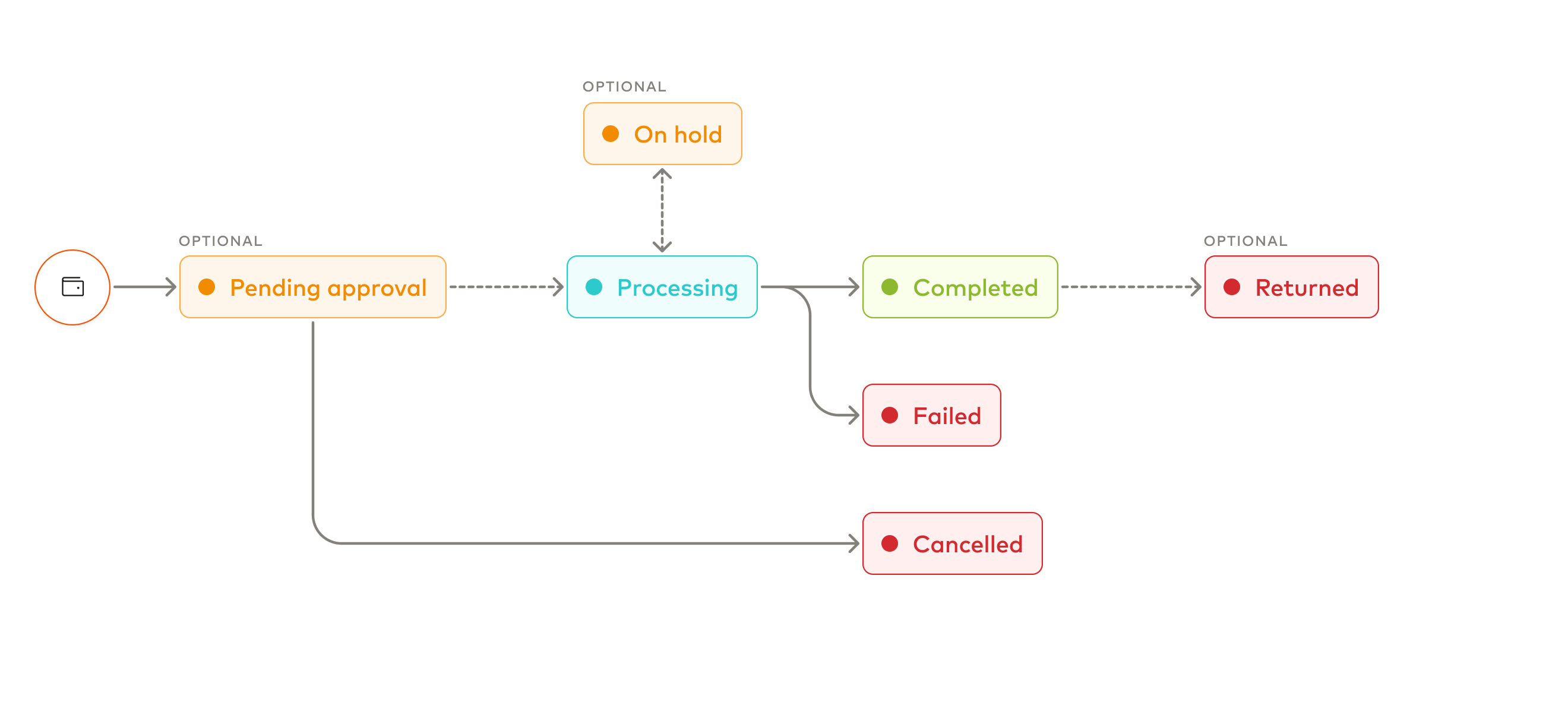
In the BVNK simulator, you can test the following behaviours:
| Flow | Prefix | Description |
|---|---|---|
| NORMAL | Not Applicable | Standard process that does not require a prefix to simulate a payout. |
| FAILED | FAILED | This flow is used to simulate a failure on the banking partner side such as the payment scheme rejecting the payout. |
| RETURN | RETURN | This process simulates a successful payout, followed by a return event. In this scenario, the payout initially appears to be successful, as it has been submitted to the beneficiary's bank. However, the bank ultimately rejects the payment, or the customer decides to reverse the transaction. |
To test these behaviours in the sandbox environment, start the payout's reference with the prefix of the flow you want to simulate. Which field carries the prefix depends on the API version:
- v.2 and v.3 payouts: the remittance information,
beneficiary.remittanceInformationin aPOST /payment/v2/payoutsrequest. Remittance information isn't in the Payments API v.3 reference yet. - v.1 payouts: the payment reference,
paymentReference.
If you don't include a prefix, the payout follows the NORMAL flow. For example, to simulate a failed payout, format the remittance information as FAILED<your-reference>, such as FAILEDINV-2024-001.