Prepare for integration
Cards is in beta and may change as we continue to improve it. Please review the documentation and endpoints carefully, test everything in the sandbox, and reach out to the Solutions team if you need help.
This guide details the prerequisites for integrating BVNK's Cards capabilities into your platform. Cards use the Embedded Custom delivery model, where your platform manages the customer experience and BVNK handles card issuance, transaction authorisation, and PCI-scoped operations.
Sandbox account and API credentials
The sandbox environment mirrors production but operates with test data, allowing you to build and validate your integration without financial risk.
Your sandbox account provides access to the BVNK Portal where you manage wallets, configure integrations, and monitor transactions. API credentials use Hawk authentication, a cryptographic scheme that signs each request without exposing your secret key.
When configuring API keys, consider which operations your integration requires. Payouts and withdrawals require IP address allowlisting for security. Read-only operations like fetching transaction data have fewer restrictions.
Steps to complete this phase:
- Contact your Account Manager to request a sandbox account.
- After you have it, you can Create API keys there.
Customer onboarding
Cards require the Embedded Custom delivery model. Before your customers can be issued a card, they must complete BVNK's compliance onboarding process.
As a partner, you serve as the integration layer between your customers and BVNK. Collect customer information through your onboarding flows, submit it to BVNK via API, and monitor onboarding status via webhooks or polling. BVNK conducts compliance reviews and activates customer accounts upon approval.
Steps to complete this phase:
USDC wallet setup
Each card is linked to a customer's USDC wallet. Ensure the customer has a USDC wallet before issuing a card.
The wallet serves as the funding source for all card transactions. BVNK debits the wallet balance when authorising card spend and credits it for refunds or chargebacks.
After creating the wallet, locate its ID in the Wallet section of the Portal. You will need this ID to issue a card.
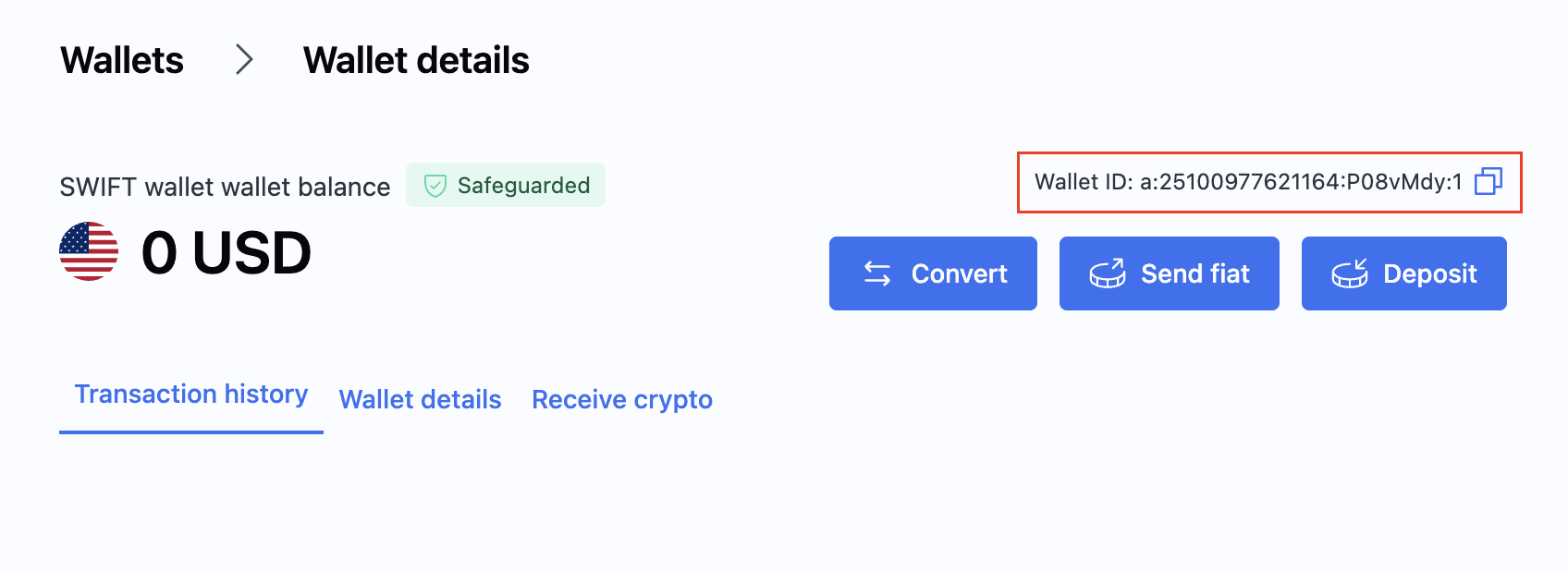
See Set up a wallet for setup instructions.
Customer data requirements
The following customer data must be on file before issuing a card:
- Phone number: Must be verified by your platform.
- Email address: Must be verified by your platform.
- KYC approved: A customer must be fully onboarded and verified by BVNK.
- Supported jurisdiction: A customer must be in a jurisdiction that supports cards.
- BVNK entity: A customer must be signed to a BVNK entity that can issue cards.
BVNK does not independently validate customer contact information. Your platform is responsible for verifying phone numbers and email addresses.
PCI compliance
As a partner integrating Cards, you must be PCI-compliant but do not require PCI certification.
Sensitive card data (PAN, CVV, expiry date) is displayed via the BVNK front-end SDK in a PCI-scoped iFrame. Your application does not receive or store cardholder data. You must confirm that your operations are PCI-compliant.
UI review
Your card issuance UI must meet specific requirements before launch. For example, card terms acceptance must be a separate step, not included in the general onboarding flow. Customers must complete BVNK onboarding before accessing the card terms acceptance screen.
BVNK will review detailed requirements with you during integration. You will need to submit a video recording of your final UI for approval. We recommend sharing your designs early to minimise potential revisions.
Webhook integration
Webhooks provide real-time notifications of card and transaction state changes, removing the need for continuous polling.
Your webhook endpoint receives HTTP POST requests from BVNK for relevant events such as card status changes, transaction authorisations, settlements, and declines. Design your endpoint to acknowledge receipt immediately by returning HTTP 200 and process events asynchronously to avoid timeouts.
Webhook payloads include cryptographic signatures for authenticity verification. Implement signature validation to ensure requests are from BVNK and have not been tampered with.
Subscribe to the following card webhook events:
bvnk:card:card:updated— card lifecycle changes (status transitions, limit updates)bvnk:card:transaction:status-change— transaction status changes (authorisations, settlements, declines)
Steps to complete this phase:
- Configure webhooks for endpoint setup and signature verification examples.
Integration testing
Use the sandbox environment to validate your Cards implementation before going live. Test the full lifecycle:
- Customer onboarding and eligibility checks
- Card issuance and activation
- Viewing card details via the SDK
- Transaction authorisation, settlement, and decline scenarios
- Card controls (freeze, unfreeze, cancel)
- Webhook delivery for all card and transaction events
Use the simulation endpoints to generate test transactions and exercise the full transaction lifecycle in sandbox.
Go live
Production activation requires coordination with your account manager. Sandbox configuration does not transfer automatically; you must replicate settings in your live account.
Update your codebase to use production credentials and endpoints. The base URL changes from https://api.sandbox.bvnk.com/ to https://api.bvnk.com/. Generate new API keys in your live Portal account and configure webhooks with production endpoint URLs.
Before processing real transactions, ensure customer onboarding is complete and all webhook subscriptions are active.
What's next?
After completing all prerequisites above, proceed with implementing Cards.