Overpayments
Overpayments occur when end-users send more cryptocurrency than intended. For example, they intend to send 0.01 ETH but send 0.1 ETH instead. In this case, the payment still transitions to a COMPLETE status.
To give greater flexibility to your customers on how much they send crypto top-ups is recommended.
How can I see the actual amount received?
To see the actual received amount, on the transactionConfirmed webhook, compare the fields:
paidCurrency.actualindicates the amount you received.paidCurrency.amountindicates the original expected amount.
Handle overpayments
To ensure the best customer experience when managing overpayments, it is advisable to adjust the final payment made by the end user to reflect the higher total amount received. This method eliminates the need to return minor excess amounts of cryptocurrency. Instead, the complete sum will be credited to the end user's account. There is the Settle Merchant Wallet setting, where the total sent amount is deposited into the MID wallet associated with the transaction.
The sent amount is indicated in the .actual field, which can then be referenced to update the end user's total payment amount in your system, in relation to the requested .amount field.
In certain circumstances, such as regulatory issues that may arise when receiving more crypto than requested, the following alternative options can be used:
-
Handle manually: will retain the excess fraction of the transaction in its original cryptocurrency and deposit it into an equivalent cryptocurrency wallet on your account. The original payment amount is sent to the MID-linked wallet. You can then use the payout functionality to manually return the excess amount to the end user if required.
Example: the customer must pay 300 USDC and deposits 500 USDC instead. You decide to handle the overpayment manually: settle 300 USDC to their fiat wallet, and keep the 200 USDC in their cryptocurrency wallet.
-
Auto refund: will send the original payment amount to the MID-linked wallet. Any additional amount will be kept separately. An automatic payout request will be generated, resulting in a unique URL. This URL must be sent to the end user for final confirmation of the address where the excess funds should be sent.
Example: the customer must pay 300 USDC but deposits 500 USDC instead. You decide to settle 300 USDC to their fiat wallet and refund the rest. Any additional amount is kept separately. The payment refund request is generated and the link is automatically sent to a customer so they can claim the excessive funds. The link remains active for three months. If the customer doesn't claim the funds within this period, the funds are settled into the customer's account.
-
Upper threshold: you can also set an upper threshold to define an acceptable overpayment variance margin. When it is active, any overpayment that falls within your specified buffer will be automatically accepted and processed as successful, overriding any Auto Refund or Handle manually configurations. If an overpayment exceeds this allowed threshold, the buffer is completely disregarded. In this case, the system reverts to your standard overpayment settings to handle or refund the full excess amount received.
Reach out to your account manager to enable this feature.Example: the customer must pay 100 USDT, overpayment refunds are enabled, and the upper threshold is set to 10 USDT. If the customer pays 105 USDT, the payment is successfully processed because the overpayment falls within the accepted threshold buffer. If the customer pays 115 USDT instead, the overpayment exceeds the threshold margin, and the system triggers your default overpayment configuration, generating an automatic refund request for the full excess amount of 15 USDT.
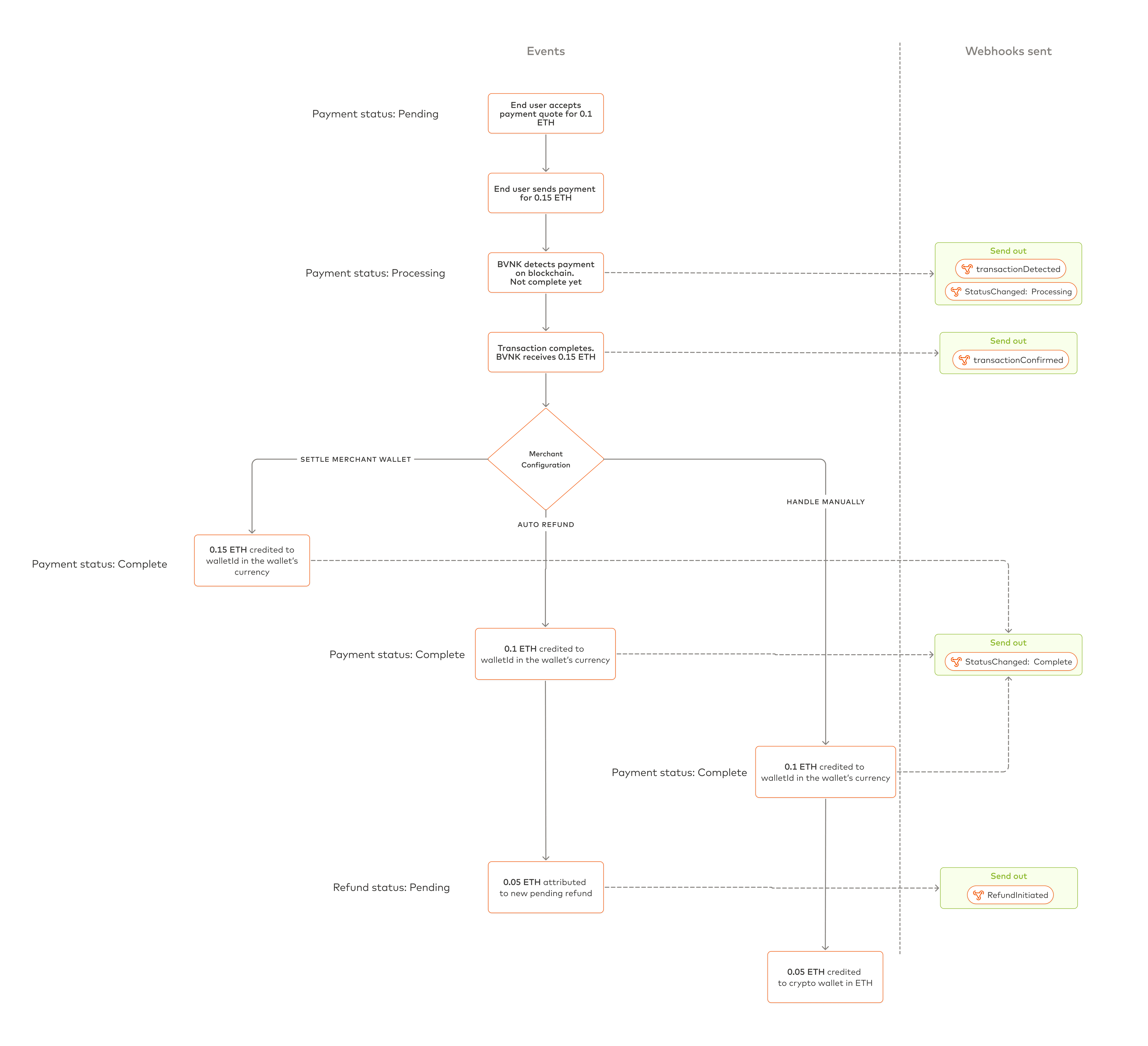
Overpayment exception flows
The summary of the flow for three different outcomes is given below:
| Configuration | Balance impact | Status |
|---|---|---|
| Settle Merchant Wallet | Full amount of the overpayment is credited to your MID wallet in your wallet currency. For more information on a MID wallet, refer to the merchant setup guide. | COMPLETE |
| Handle Manually | The original payment amount is credited to your MID wallet in the currency of your wallet. The excess amount of cryptocurrency received is credited to the cryptocurrency wallet in the currency of the payment. | COMPLETE |
| Auto Refund | Functions similarly to Handle Manually, except it is done automatically for you. The original payment amount is credited to your MID wallet in the currency of your wallet. The excess amount of cryptocurrency received will be attributed to a new refund payout that will be auto created. | COMPLETE, PENDING (refund) |
| Upper Threshold | The full received amount is automatically accepted and credited to your MID wallet if it falls within your defined buffer, overriding standard overpayment configurations. | COMPLETE |
To change your configuration or learn more, contact your Account or Integration Manager.