Payment in
The Payment In flow allows merchant's end-users to select their digital asset of choice to pay with.
Payment In Sequence Diagram
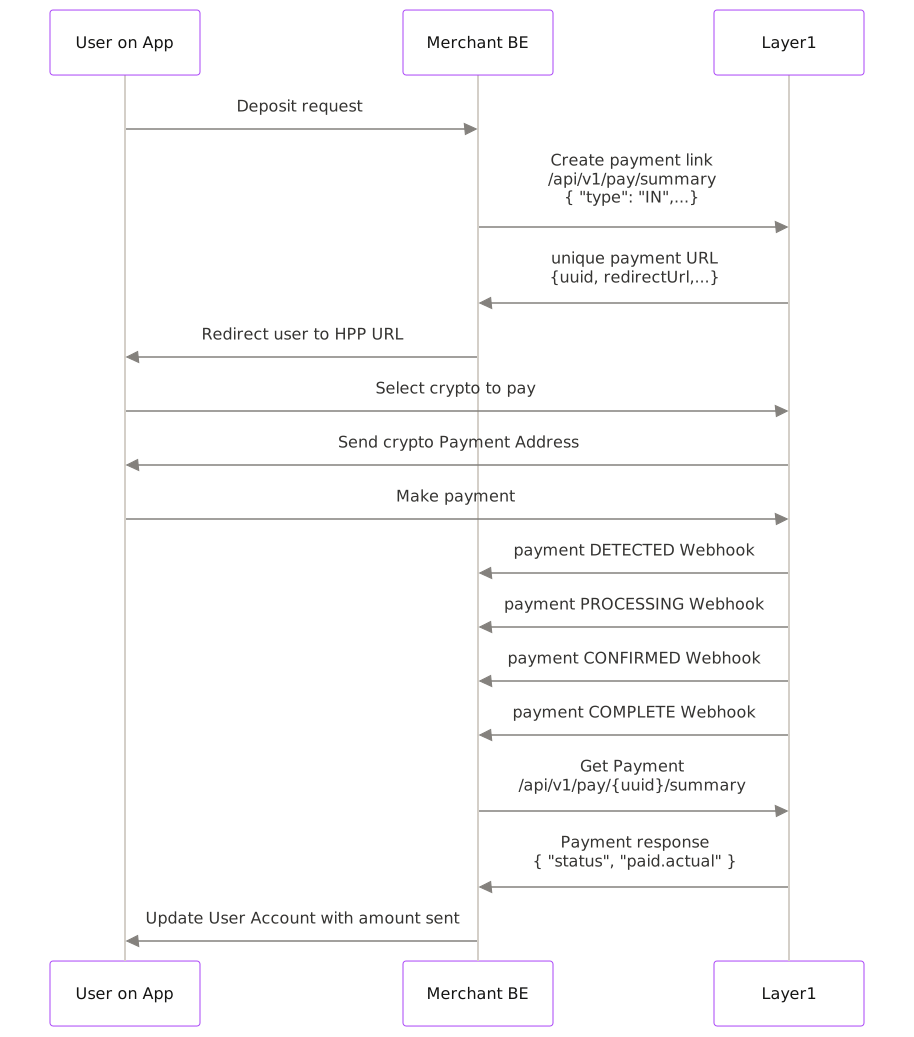
The general happy path will be discussed, with exception scenarios discussed later on in the guide:
- The end user will request to make a deposit on your system, which will then be forward onto us in the form of a Create Payment request.
- The Create Payment endpoint will return a redirectUrl, along with other useful data in the API response. End user can then be directed to this URL which hosts our payments page
- The end user will select the digital asset and network in the dropdown that they want to make the payment with, and as this is now on our hosted page, the request is sent directly to us.
- We generate an blockchain address to match the requested digital asset and network, and auto-update the Hosted Payments Page to display this newly created address.
- The end user makes a payment to this address, which will then cause multiple related webhooks to be sent to your webhook listener as the payment goes through its lifecycle.
- Once you receive the final
COMPLETEwebhook you can poll the Get Payment endpoint to confirm the status and final paid amount, or take the information from the webhook. - Update the end users account accordingly with the confirmed payment amount.
Payment Lifecycle
A payment undergoes several status changes throughout its lifecycle, detailed as follows:
| Status | Immutable? | Description |
|---|---|---|
| Pending | No | The initial status of your payment. It remains in this state until the payment either expires or a transaction linked to this payment is detected on the blockchain. |
| Processing | No | This status indicates that the customer's payment has been detected on the blockchain. The payment remains in this state until funds are credited to your wallet. Note: Payments can still expire in this state if the transaction lacks sufficient gas or if the blockchain does not confirm the transaction within the expiry time. |
| Complete | Yes | This status means that the funds have been received and credited to the merchant account in the chosen currency. |
| Underpaid | Yes | Indicates that the funds have been received and credited to the merchant account in the chosen currency, but the amount sent by the customer was less than the requested amount. |
| Expired | Yes | The payment expired before the customer sent the funds. |
Initiating the payment in
To initiate a payment process, utilize the Create Payment endpoint.
Below are the details required for the create payment request. Set type to IN, and use the Merchant ID from the Merchant Details page as merchantId. If you omit expiryMinutes, the payment expires after 1440 minutes.
Example Request
Here is how an example request might look:
{
  "merchantId": "00a4af9d-ad4b-42d5-bec4-b7a8c90161fe",
  "amount": 100,
  "expiryMinutes": 60,
  "currency": "USD",
  "returnUrl": "https://yourwebsitename.com",
  "reference": "6a4013c2-5fa9-4e2f-bef7-88c5570b6501",
  "type": "IN"
}
Example Response
Upon successfully submitting the request, you'll receive a response like the following:
Response
{
  "uuid": "fef4e99d-b41d-4efe-89fd-4fdf41f3f33f",
  "merchantDisplayName": "Metallica Inc",
  "merchantId": "00a4af9d-ad4b-42d5-bec4-b7a8c90161fe",
  "dateCreated": 1704807605678,
  "expiryDate": 1704808805678,
  "quoteExpiryDate": 1704808806000,
  "acceptanceExpiryDate": 1704807636000,
  "quoteStatus": "ACCEPTED",
  "reference": "a003cec4-abf5-42aa-baf0-43a1cc815536",
  "type": "IN",
  "subType": "merchantPayIn",
  "status": "PENDING",
  "displayCurrency": {
    "currency": "USD",
    "amount": 100,
    "actual": 0
  },
  "walletCurrency": {
    "currency": "EUR",
    "amount": 100,
    "actual": 0
  },
  "paidCurrency": {
    "currency": null,
    "amount": 0,
    "actual": 0
  },
  "feeCurrency": {
    "currency": "EUR",
    "amount": 1,
    "actual": 0
  },
  "displayRate": null,
  "exchangeRate": null,
  "address": null,
  "returnUrl": "https://yourwebsitename.com",
  "redirectUrl": "https://pay.sandbox.layer1.com/payin?uuid=fef4e99d-b41d-4efe-89fd-4fdf41f3f33f",
  "transactions": [],
  "refund": null,
  "refunds": []
}
At this juncture, it's crucial to note the uuid and redirectUrl.
The uuid is used for querying the payment status, and the redirectUrl directs the end-user to the Hosted Payments Page for digital asset selection.
Note that as the payment currency is not known at this stage, exchange rates and paid currency values are null
If you already know the digital asset the end-user will pay with, refer to the next guide for creating a tailored payment request.