Approvals for withdrawals
Approval settings allow you to configure rules to govern outgoing transactions from your asset pools. By default, withdrawals need no approval. You can require approvals for withdrawals made in the Layer1 Portal and for withdrawals made through the API, each with its own rules: for all withdrawals, for withdrawals above an amount, or when the total over a period of time gets too high.
Why do you need approvals for withdrawals?
Requiring approvals for withdrawals adds a critical layer of control and oversight to your Layer1 treasury movements. This feature provides the following benefits:
- Risk mitigation: approvals reduce the risk of accidental, unauthorised, or malicious transfers. By introducing a review step, you can prevent large or suspicious withdrawals from being executed without scrutiny.
- Customisable control: teams can configure thresholds and delegate approvers, allowing necessary stakeholders or leads to stay informed about high-impact transactions while enabling routine operations to continue smoothly.
- Auditability and transparency: all approvals and rejections are logged and traceable. This strengthens accountability across teams and simplifies post-transaction reviews or compliance audits.
- Peace of mind for stakeholders: funds are protected by policy and oversight, not just technical safeguards, which builds trust at both operational and executive levels.
Configure approvals for withdrawals
To configure approvals, you must have the approval-settings:operator role. Approvers need the crypto:withdrawal:approver role. See Assign approver roles.
- Portal
- API
To configure approvals for withdrawals, do the following:
-
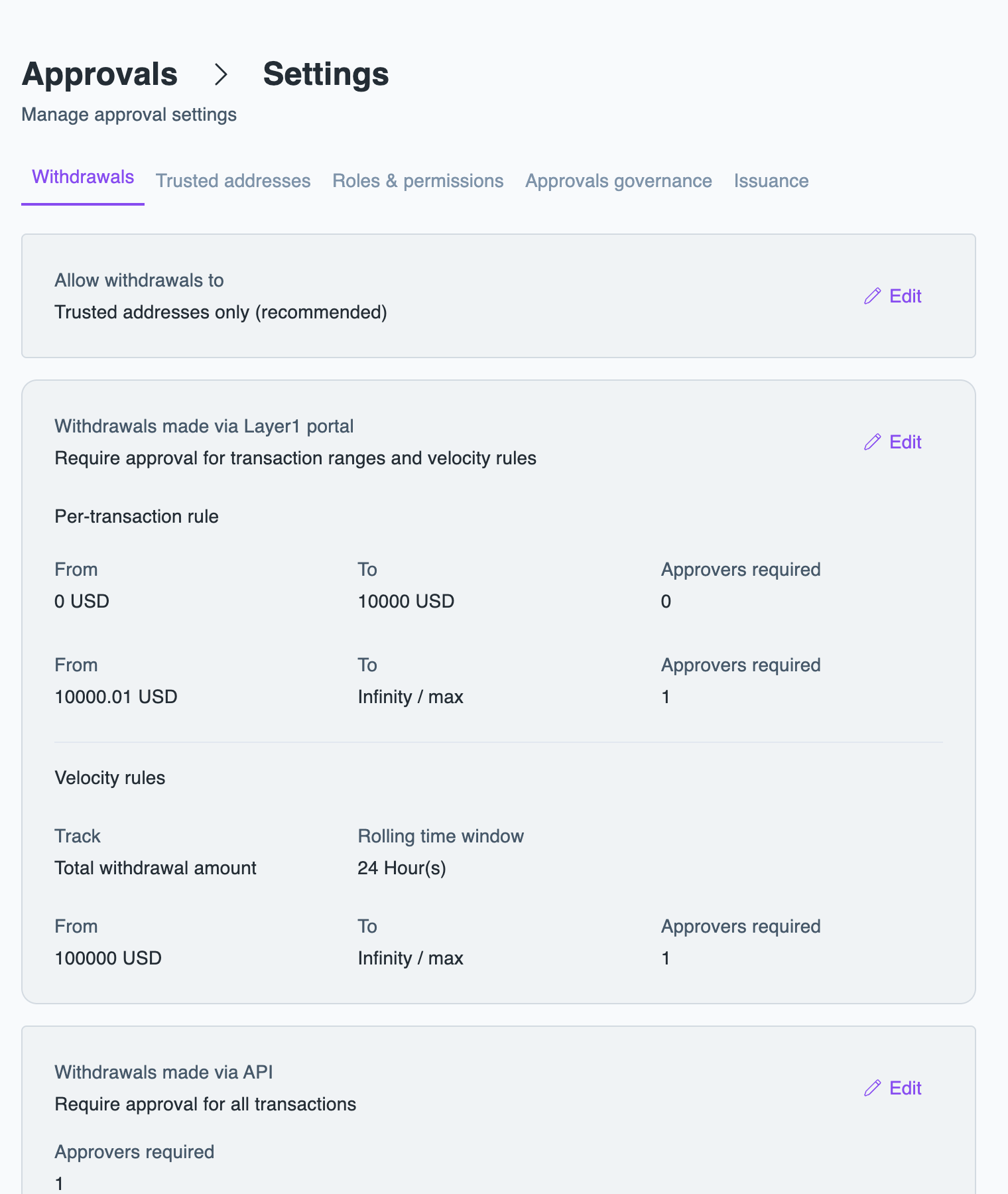
In the Layer1 Portal, go to Approvals > Settings, select the Withdrawals tab, and click Edit.
-
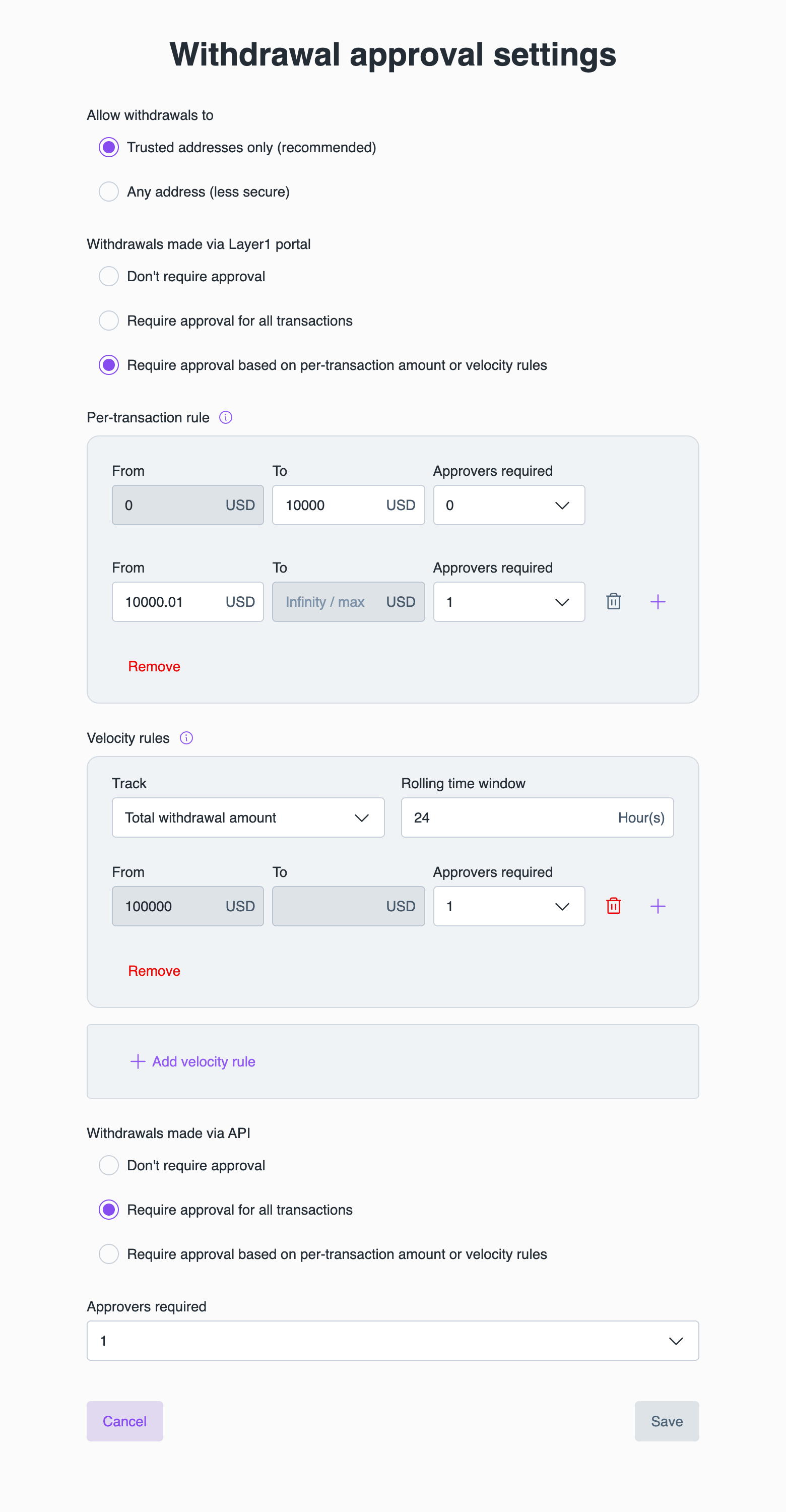
Under Allow withdrawals to, select Trusted addresses only (recommended) or Any address (less secure). For more information, see Restrict withdrawals to trusted addresses.
-
For Withdrawals made via Layer1 portal and Withdrawals made via API, select one of the following:
- Don't require approval.
- Require approval for all transactions, then select the number of Approvers required.
- Require approval based on per-transaction amount or velocity rules, then set per-transaction rules, velocity rules, or both.
-
Click Save.
To remove approvals for a source, select Don't require approval and click Save.
Per-transaction rules
Per-transaction rules set the number of approvals by the amount of a single withdrawal. For example, a withdrawal from 0 to 10,000 USD needs no approval, and a withdrawal above 10,000 USD needs one.
Each range has a From value, a To value, and the number of Approvers required. The first range starts at 0, and the ranges must not overlap or leave gaps. In the Portal, the From value of each new range is filled in from the previous range. To add a range, click the plus icon; to remove one, click the trash icon.
Velocity rules
Velocity rules add approvals based on withdrawal activity over a rolling time window, rather than on a single withdrawal. For example, if the withdrawals of the last 24 hours add up to more than 100,000 USD, the next withdrawal needs one extra approval.
Each velocity rule tracks either the Total withdrawal amount or the Total number of transactions within a Rolling time window, for example 1 hour or 24 hours. Within each rule, you set ranges with a From and To value and the number of Approvers required. To add another rule, click Add velocity rule. For example, you can add one rule for the hourly withdrawal amount and another for the number of transactions per hour.
To include withdrawals that are still waiting for approval in the total, select Count withdrawals waiting for approval.
If several velocity rules apply, the strictest one wins. Approvals from a velocity rule are in addition to the approvals the per-transaction rule requires.
Restrict withdrawals to trusted addresses
To increase security around withdrawals, limit withdrawals to trusted addresses only. Trusted addresses are addresses linked to a contact you have created within your Layer1 instance. For more information on creating contacts, see Add a contact.
To restrict withdrawals, select Trusted addresses only (recommended) under Allow withdrawals to, or set trustedContactsEnabled to true through the API.
Combined with approvals for trusted addresses, nobody can send funds to a new address alone.
Approve withdrawals
A withdrawal that needs approval waits in Approvals with the status APPROVAL_REQUESTED. To approve or reject it, see Approve or reject a request. Pending withdrawals expire after seven days.