Receive fiat funds via SWIFT
To receive fiat funds in your BVNK virtual account, you can deposit EUR, GBP, or USD from a registered bank account. This guide explains how SWIFT wallets work and how to obtain the deposit details your senders need.
SWIFT wallets at BVNK are pooled accounts. Multiple customers share a consolidated SWIFT account, and BVNK uses the payment reference to allocate incoming funds to the correct wallet.
How SWIFT pooled accounts work
When you receive a SWIFT pay-in:
- The sender initiates a payment from their bank to the BVNK SWIFT account.
- BVNK receives the payment and checks the payment reference field.
- Based on the reference, BVNK assigns the payment to the correct wallet.
If the payment reference is missing or incorrect, BVNK cannot automatically match the payment. In this case, provide proof of payment, such as a bank statement or transfer confirmation, so BVNK can manually credit your wallet.
Prerequisites
Before depositing funds, ensure you have:
- A fiat wallet with the SWIFT payment method enabled. See Create a wallet.
- A registered bank account on your BVNK Settings page (for Portal deposits).
Get deposit details
Retrieve the deposit details to share with the sender.
- API
- Portal
To get your wallet's deposit details via API, send the GET /ledger/v1/wallets/{id} request:
In the response, locate the ledgers array. For fiat wallets, extract the accountNumber, code, and paymentReference fields.
{
    "id": "a:24092328494070:G5i4XZ9:1",
    "accountReference": "3399c975-e1c1-4acf-9a90-6cfbdcdeaaea",
    "customerReference": "b94dcf2a-d377-469e-8846-e21f65b18a77",
    "name": "USD SWIFT Wallet",
    "status": "ACTIVE",
    "balance": {
        "value": 5000.00,
        "currencyCode": "USD"
    },
    "ledgers": [
        {
            "type": "FIAT",
            "accountHolderName": "System Pay Services (Malta) Limited",
            "accountNumber": "ES8201828510940200010371",
            "code": "BBVAESMMXXX",
            "accountNumberFormat": "SWIFT",
            "paymentReference": "REF DZ0XJL4",
            "bank": {
                "identificationCode": "BBVAESMMXXX",
                "name": "Banco Bilbao Vizcaya Argentaria, S.A.",
                "address": {
                    "addressLine1": "De San Nicolas 4",
                    "city": "Bilboa",
                    "postCode": "48005",
                    "country": "ES"
                }
            }
        }
    ]
}
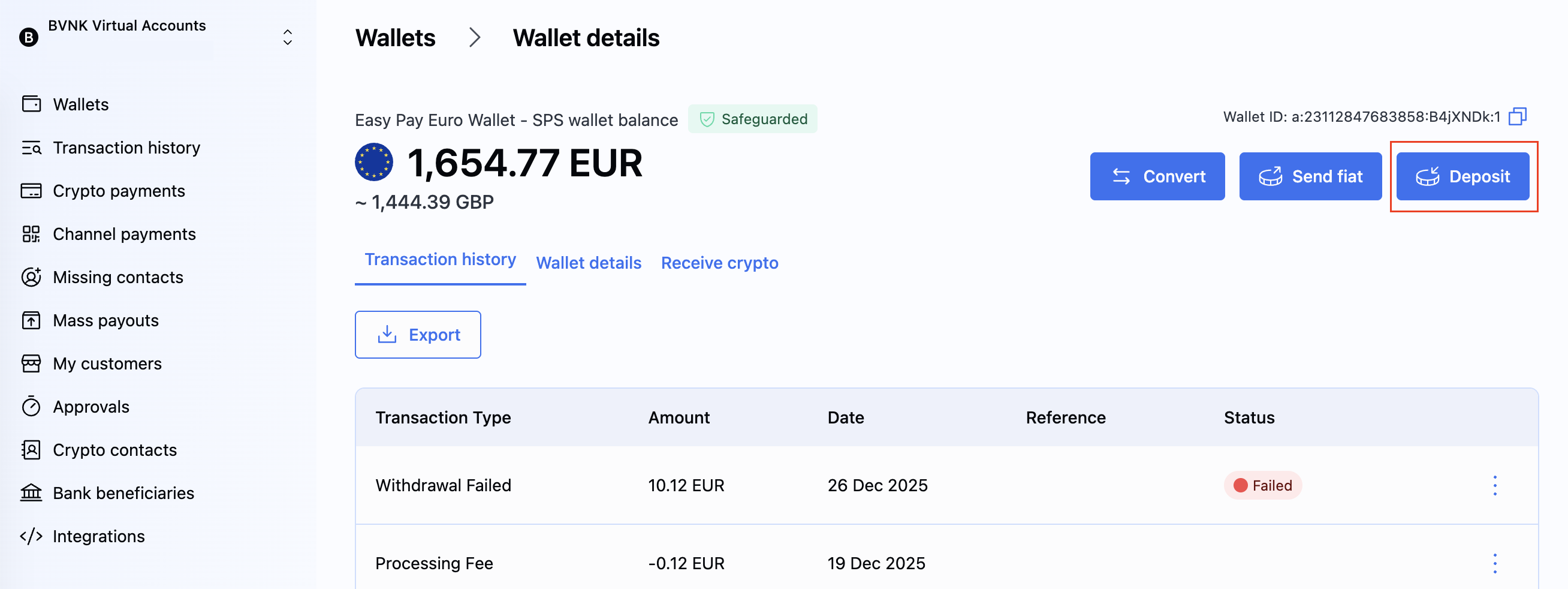
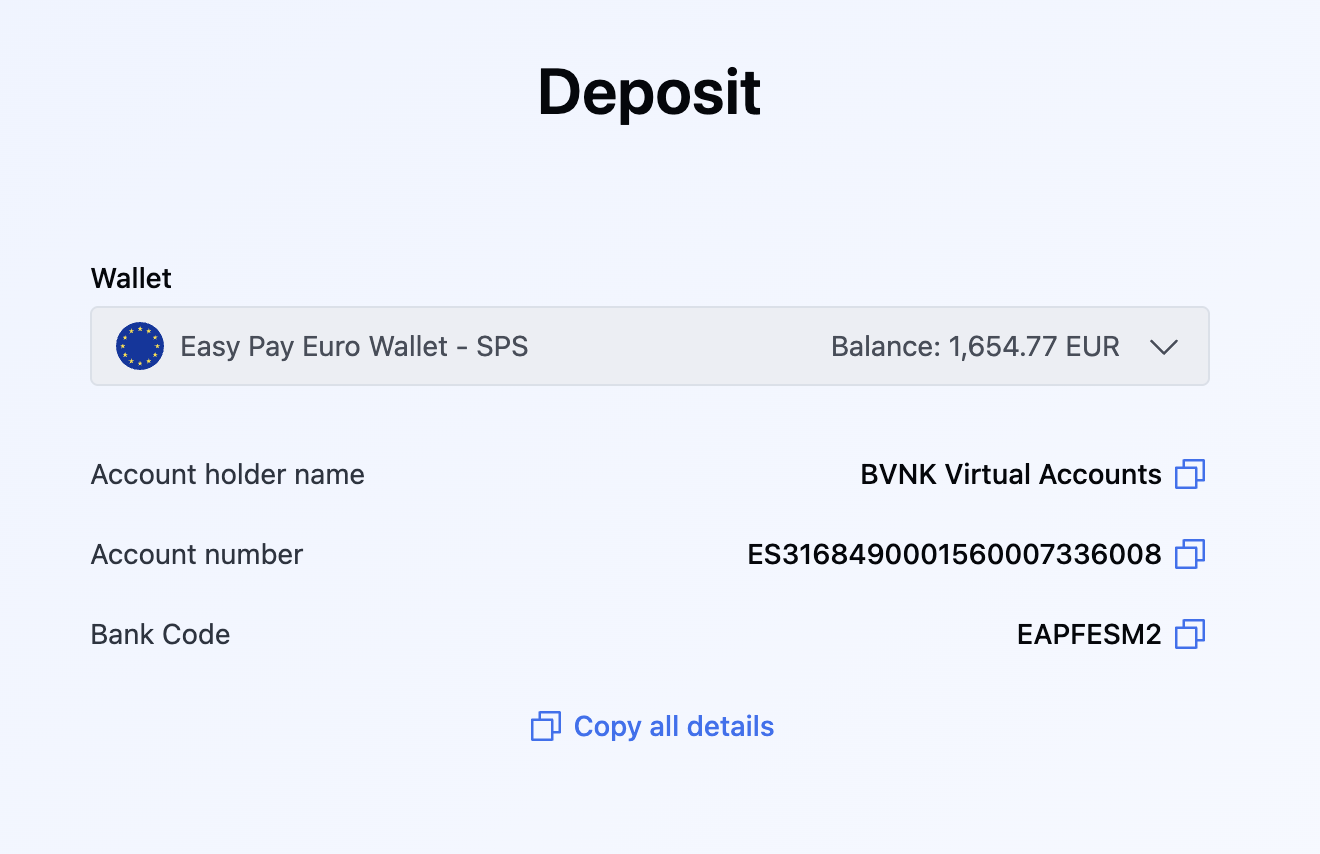
Provide payment instructions to senders
Provide the following details to anyone sending funds to your SWIFT wallet:
| Parameter | API field name | Description |
|---|---|---|
| Account number | accountNumber | The IBAN or account number for the BVNK SWIFT account. |
| SWIFT/BIC code | code | The bank identifier code for the receiving bank. |
| Payment reference | paymentReference | Unique reference for your account. Use this as the payment reference when instructing senders. |
Instruct external senders to include the paymentReference when transferring funds to your BVNK SWIFT wallet. The sending bank must include this value in the payment instructions to link the payment to your account.
Ensure senders use the same paymentReference for all future transfers to your BVNK wallet.
What happens without a payment reference
If the sender omits the payment reference:
- BVNK cannot automatically assign the payment to your wallet.
- You must provide proof of payment (such as a bank statement or transfer confirmation) to BVNK support.
- After verification, BVNK manually credits the funds to your wallet.
This process may delay the availability of your funds.
Test in sandbox
To simulate a SWIFT pay-in in the sandbox environment, send the POST /payment/v2/payins/simulation request:
{
    "id": "a:25112856360743:5paGBL3:1",
    "accountReference": "b94c42ec-f87f-4ecb-a0ce-01182fe59eb8",
    "customerReference": "ab3529ed-29c2-447b-947f-fd5b4eb83a37",
    "name": "EUR SWIFT",
    "status": "ACTIVE",
    "balance": {
        "value": 0.00,
        "currencyCode": "EUR"
    },
    "ledgers": [
        {
            "type": "FIAT",
            "accountHolderName": "System Pay Services (Malta) Limited",
            "accountNumber": "ES8201828510940200010371",
            "code": "BBVAESMMXXX",
            "accountNumberFormat": "SWIFT",
            "paymentReference": "REF DZ0XJL4",
            "bank": {
                "identificationCode": "BBVAESMMXXX",
                "name": "Banco Bilbao Vizcaya Argentaria, S.A.",
                "address": {
                    "addressLine1": "De San Nicolas 4",
                    "city": "Bilboa",
                    "postCode": "48005",
                    "country": "ES"
                }
            }
        }
    ]
}
For more simulation options, see Try fiat payments in simulator.
What's next?
- Send payments to customers
- Refund fiat pay-ins
- Configure webhooks to receive real-time notifications about incoming payments