Send payments
To create a fiat payout for local payment rails, you must have the following:
- Recipient's account number.
- Recipient's bank account details:
- For GBP payments: SCAN and IBAN
- For EUR payments: IBAN
- For USD payments: ABA routing number
If invalid bank details are provided, such as an incorrect bank code or account number, the payout request will be rejected with an error message returned.
To create a fiat payout for international payments via SWIFT, you must first acquire the following information:
- Payee's full name or company name and address.
- Bank Account Number (IBAN or other, depending on the currency)
- Name and address of the payee's bank
- Payee's SWIFT or Bank identifier Code (BIC) bank code.
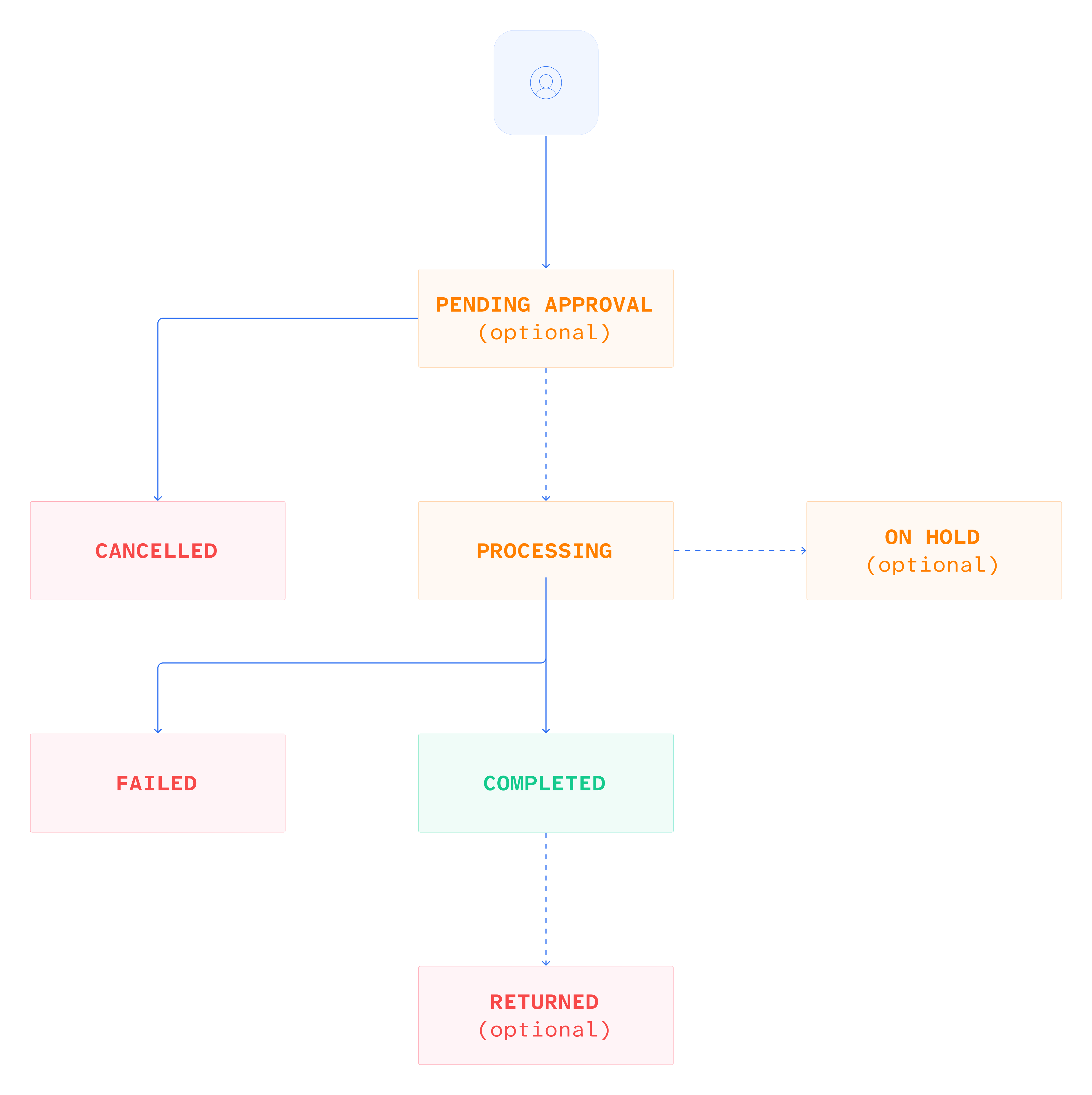
The following diagram shows the flow of a fiat pay out.
Create payout
To create a payout, send the POST /payment/v2/payouts request with the payload:
- Individual
- Company
{
    "walletId": "a:24092324785677:o6rhCEZ:1",
    "amount": 1000.5,
    "currency": "EUR",
    "method": "SEPA_CT",
    "reference": "PAYOUT-2025-001",
    "beneficiary": {
        "remittanceInformation": "Payment for services",
        "entity": {
            "type": "INDIVIDUAL",
            "firstName": "John",
            "lastName": "Dove",
            "dateOfBirth": "15-01-1990",
            "relationshipType": "SELF_OWNED",
            "address": {
                "addressLine1": "123 Main St",
                "city": "New York",
                "region": "NY",
                "postCode": "10001",
                "country": "US"
            }
        },
        "bankAccount": {
            "accountNumber": "000123456789",
            "accountType": "CHECKING",
            "bank": {
                "identificationCode": "ATFEUS33",
                "nid": "021000021",
                "address": {
                    "addressLine1": "383 MADISON AVENUE",
                    "city": "New York",
                    "region": "NY",
                    "postCode": "10001",
                    "country": "US"
                }
            }
        }
    },
    "fees": {
        "customerFee": {
            "amount": 5,
            "currency": "USD"
        }
    },
    "metadata": {
        "source": "api",
        "merchantId": "merchantOne"
    },
    "requestDetails": {
        "originator": {
            "ipAddress": "10.0.0.2"
        }
    }
}
While EUR local transfers have fewer requirements, for USD payments and SWIFT transactions, it's advisable to provide comprehensive details to prevent potential rejection by the banking partner.
In the successful response, you receive the standard payment details.
- Individual
- Company
{
    "id": "550e8400-e29b-41d4-a716-446655440000",
    "method": "SEPA_CT",
    "reference": "PAYOUT-2025-001",
    "status": "PROCESSING",
    "type": "payment:payout:fiat",
    "direction": "OUT",
    "fees": {
        "customerFee": {
            "amount": 5,
            "currency": "EUR"
        },
        "processingFee": {
            "amount": 1,
            "currency": "EUR"
        }
    },
    "originator": {
        "amount": 1000.5,
        "currency": "EUR",
        "walletId": "a:24092324785677:o6rhCEZ:1"
    },
    "beneficiary": {
        "remittanceInformation": "Payment for services",
        "amount": 1000.5,
        "currency": "EUR",
        "entity": {
            "type": "INDIVIDUAL",
            "firstName": "John",
            "lastName": "Dove",
            "relationshipType": "BENEFICIARY"
        },
        "bankAccount": {
            "accountNumber": "000123456789",
            "bank": {
                "identificationCode": "ATFEUS33"
            }
        }
    },
    "createdAt": "2024-01-15T10:30:00Z",
    "updatedAt": "2024-01-15T10:35:00Z",
    "metadata": {
        "source": "api",
        "merchantId": "merchantOne"
    }
}
In case of payment in Euro, the transaction is subject to Verification of Payee (VoP).
Request VoP
VoP is a SEPA (Single Euro Payments Area) service that verifies a beneficiary's name against their IBAN to prevent fraud and errors. Before a SEPA Credit Transfer (SCT) or SEPA Instant Transfer (SCT inst) is authorized, the originator's bank will check the provided name and IBAN with the beneficiary's bank and report the result (Match, Close match, or No match) back to the originator. This is a regulatory requirement under the Instant Payments Regulation to enhance security for euro transfers within the SEPA zone.
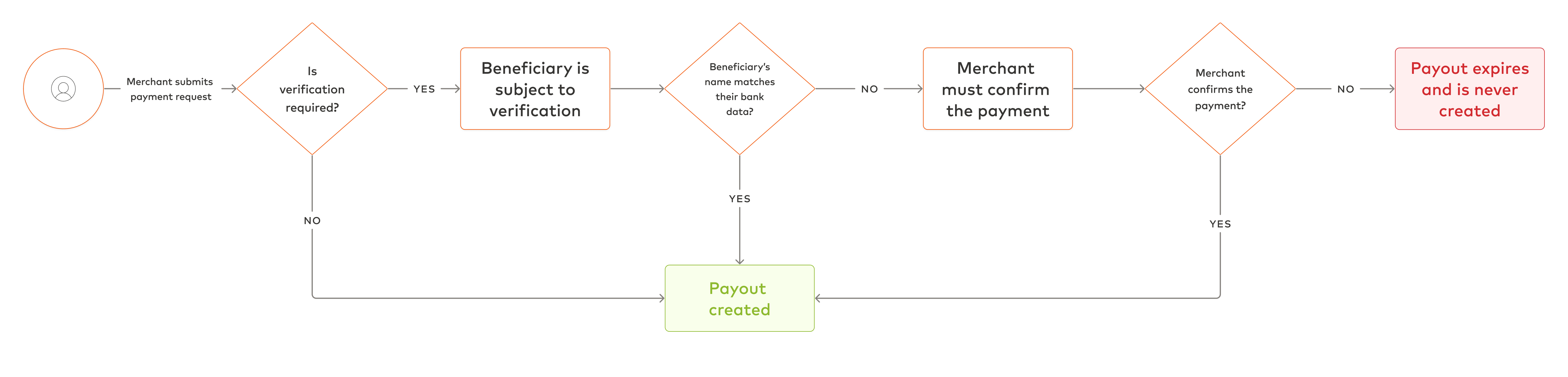
When performing VoP, the system may return one of the following results:
- Successful verification: The beneficiary's name matches. The payment proceeds automatically.
- Partial match: The provided name is similar to the one associated with the IBAN, but not an exact match. You may still send the payment at your own risk, but there is a chance it may not be processed successfully.
- No match: The beneficiary's name does not match at all. You may still attempt to send the payment, but the likelihood of rejection increases.
- Failed verification due to other reasons:
- For instance, technical issues may arise if the verification service is unavailable.
- Others, for example, if a beneficiary's bank decides not to conduct verification.
All results, except for the successful verification, indicate that if the beneficiary's name in the request doesn't match the name in the beneficiary's bank account, the bank will issue a warning about the inconsistency. In this case, the status 202 is returned. The actualName field is only returned for PARTIAL_MATCH.
- Partial Match
- No Match
- Technical Issue
- Not Possible
{
  "id": "3fa85f64-5717-4562-b3fc-2c963f66afa6",
  "requiredAction": "CONFIRM_BENEFICIARY",
  "status": "PAYEE_VERIFICATION_REQUIRED",
  "verificationResult": {
    "matchStatus": "PARTIAL_MATCH",
    "actualName": "George D Collins",
    "providedName": "George Colline"
  }
}
Status 202 means that you must send another request to confirm the operation. See Send confirmation below.
You can also test how verification works in the sandbox. For that, use the following test names and IBANs, when sending the payment request:
- Full match
- Partial Match
- No Match
- First Name: John Smith
- Last Name: Doe
- IBAN: MT45SYPL39480744067217548372015
- BIC: SYPLMTM2XXX
There are two ways of verifying the beneficiary's name:
- As part of the Payout process: by calling another endpoint to confirm the payout operation. See Confirm payout.
- As a separate two-step process, where you verify a beneficiary via a separate endpoint and then make the payout using the received
verificationId. See Integrate two-step verification.
Confirm payout
You can use this method after making a payout in euros described earlier and receive a response with any of the following status values :
PARTIAL_MATCHNO_MATCHNOT_POSSIBLETECHNICAL_ERROR
The statuses indicate that the beneficiary's name doesn't match the one associated with the beneficiary's bank account or cannot be verified.
If you are aware of this inconsistency and would like to proceed with the payment anyway, send a POST /payment/v2/payouts/{id}/actions request with id of the transaction received in the 202 response and the following body.
{
    "type": "CONFIRM_BENEFICIARY"
}
In the successful response, you receive the standard payout details, as shown earlier.
If the operation is not confirmed within five minutes, it expires.
If you provide the wrong transaction ID or send the confirmation request after its expiration, an error is returned. In this case, you will have to create a new payout.
Integrate two-step verification
Alternatively, you can verify the beneficiary's name using the verification endpoint. Note that in case you follow this approach, step 1 of the following procedure must be completed before creating the payout.
To verify the beneficiary's name, do the following:
-
Send the
POST /platform/v1/beneficiaries/verificationrequest.{"accountNumber": "GB29MDTR60000131926819","bankCode": "MDTRGB2L","firstName": "John","lastName": "Smith","businessName": "Acme Corporation Ltd","currency": "GBP"}In the successful response, you receive the name match status and validation period:
{"id" : "550e8400-e29b-41d4-a716-446655440000","matchStatus" : "MATCH","providedName" : "John Smith","actualName": "J. Smith", // only present for partial match"validUntil" : "2025-01-15T14:30:00Z" // when the verification will expire} -
Send the
POST /payment/v2/payoutsrequest as described earlier. Remember to include the verificationId, acquired on step 1 in the response, as theX-Verification-Idheader.If you provide a valid
verificationIdregardless of status, BVNK verifies that it exists in the records and is not expired, then executes the payment regardless of thematchStatusvalue.The following outcomes are possible:
- If the verification session is still valid, the payout will be created, and there will be no need to verify the beneficiary.
- If the verification session is expired or
verificationIdis not found within BVNK records, the payout will not be created, and you will receive a400error.
Check payout status
To check the status of a payout, send the GET /payment/v2/payouts/{transactionReference} request.
In the successful response, you receive the details on the transaction and its status.
{
    "transactionReference": "123e4567-e89b-12d3-a456-426614174000",
    "paymentReference": "Payment for invoice #12345",
    "amount": {
        "value": 1000,
        "currency": "GBP"
    },
    "fee": {
        "value": 0.00,
        "currency": "GBP"
    },
    "walletId": "a:24071743003474:xE95Oq7:1",
    "status": "PROCESSING",
    "createdAt": "2024-09-26T14:30:00Z",
    "details": {
        "type": "FIAT",
        "beneficiary": {
            "entityType": "COMPANY",
            "businessDetails": {
                "businessName": "Doe Corp"
            },
            "address": {
                "addressLine1": "123 Main St",
                "addressLine2": "Apt 4B",
                "region": "London",
                "city": "London",
                "country": "DE",
                "postCode": "EC2R 8AH",
                "fullAddress": "123 Main St Suite 500"
            },
            "bankAccount": {
                "format": "IBAN",
                "bankName": "Meridian Trust Bank",
                "accountNumber": "GB29MDTR60000131926819",
                "bankCode": "MDTRGB2L",
                "bankAddress": {
                    "addressLine1": "123 Main St",
                    "addressLine2": "Suite 500",
                    "region": "London",
                    "city": "London",
                    "country": "DE",
                    "postCode": "12345",
                    "fullAddress": "123 Main St Suite 500"
                }
            },
            "correspondentBic": "ABCDEF12"
        }
    },
    "metadata": {
        "field1": "field1 value",
        "field2": "field2 value"
    }
}
Also, you can listen to the following webhooks to get notified when the status of the payment changes: