Prepare for integration
Sandbox account and API credentials
The sandbox environment mirrors production but operates with test data, allowing you to build and validate your integration without financial risk.
Your sandbox account provides access to the BVNK Portal where you manage wallets, configure integrations, and monitor transactions. API credentials use Hawk authentication, a cryptographic scheme that signs each request without exposing your secret key.
When configuring API keys, consider which operations your integration requires. Payouts and withdrawals require IP address whitelisting for security. Read-only operations like fetching transaction data have fewer restrictions.
Steps to complete this phase:
Customer creation
Before proceeding with the customer creation request, collect information about the customer.
To create an account for your customer, send the POST /platform/v1/customers request with the payload specific to the customer type.
Apart from the typical information, include the industry reference number and the expected monthly volumes into the request payload. Note that unlike Embedded Customer, you don't need to provide agreements or upload documents to verify the customer.
For the detailed description of the body parameters, see the Create customer endpoint.
- Company
- Individual
{
    "type": "COMPANY",
    "company": {
        "name": "TechSolutions GmbH",
        "description": "Software development and IT consulting services",
        "taxResidenceCountryCode": "DE",
        "registrationNumber": "HRB 123456",
        "industryReference": "30fdc9e7-06d8-11ef-b6e1-027612b7f6b5",
        "monthlyExpectedVolumesReference": "ef77a16d-547e-11ef-8b9c-027612b7f6b5",
        "address": {
            "addressLine1": "Unter den Linden 77",
            "city": "Berlin",
            "postalCode": "10117",
            "countryCode": "DE"
        },
        "representative": {
            "firstName": "Hans",
            "lastName": "Mueller",
            "dateOfBirth": "1980-11-29",
            "birthCountryCode": "DE",
            "address": {
                "address1": "1, Oxford Street",
                "address2": "Apartment 9",
                "postalCode": "NW1 4NP",
                "city": "London",
                "countryCode": "GB"
            }
        }
    }
}
In the successful response, you receive a unique customer reference for tracking the verification status.
- Status: 200 - Success
- Status: 400 - Bad Request
{
    "reference": "a7e21c62-27b8-4b3b-b51e-eb10edeb1731",
    "status": "PENDING"
}
| Attribute | Description |
|---|---|
reference | A unique identifier for the customer. |
status | The current status of the customer. Possible values include: * PENDING - customer is pending verification* VERIFIED - customer has been verified* REJECTED - customer has been rejected during verification. |
Fiat wallet setup
Virtual accounts connect to fiat wallets, which store your funds. Request wallet activation from your Account Manager—fiat wallets require verification before use.
Each wallet receives a virtual account with a unique vIBAN. Named accounts are issued in your business name or your customers' names for personalized payment routing.
To create a wallet for your customer, send the POST /ledger/v1/wallets request with "currencyCode": "EUR" parameter. For the detailed description of the body parameters, see the Create wallet endpoint.
{
  "currencyCode": "EUR",
  "name": "EUR Wallet",
  "customerReference": "a7e21c62-27b8-4b3b-b51e-eb10edeb1731",
  "instruction" : {
    "type": "FIAT",
    "virtualAccountRequired": true,
    "walletProfile": "fe55d078-eaad-4c8b-a917-15170548df67"
  }
}
After the wallet is created, find the wallet's ID in the Wallet section on the Portal. You will later need it for creating payments.
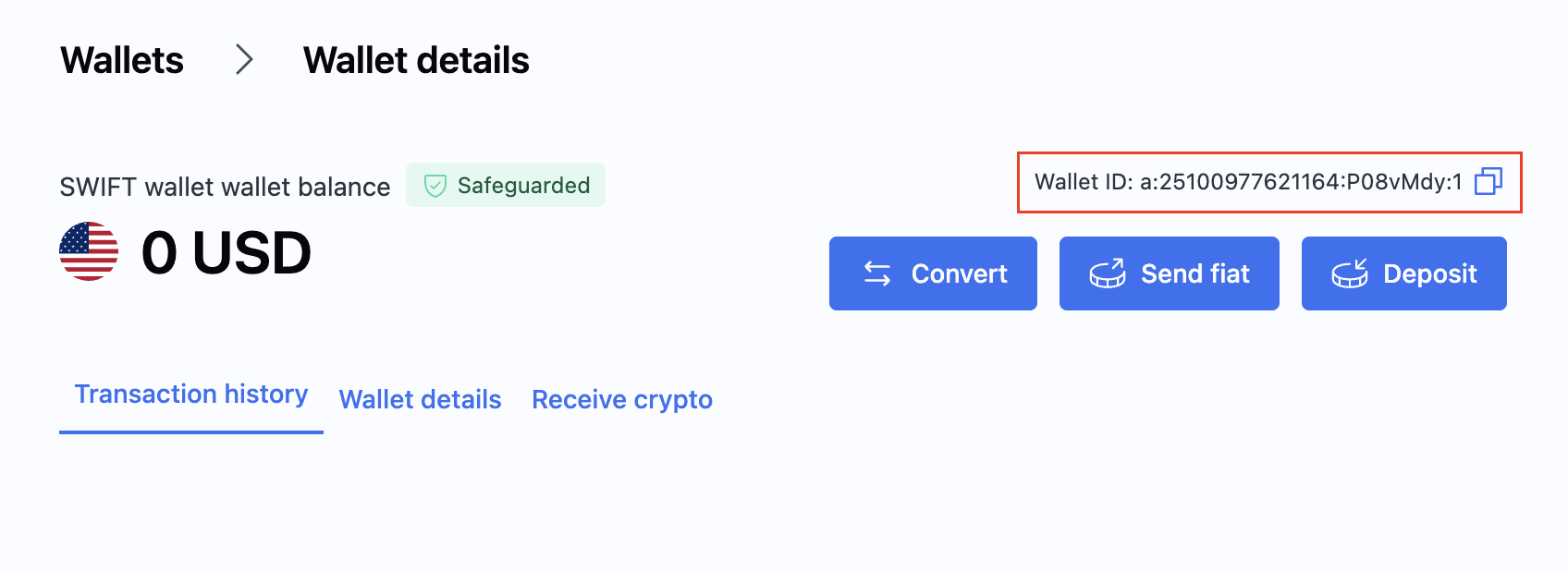
For more details and available actions on wallets, see Create a wallet.
Webhook integration
Webhooks provide real-time notifications when transaction states change, eliminating the need for continuous polling.
Your webhook endpoint receives HTTP POST requests from BVNK whenever relevant events occur—payment confirmations, status changes, customer onboarding updates, and more. Design your endpoint to acknowledge receipt immediately (return HTTP 200) and process the event asynchronously to avoid timeouts.
Webhook payloads include cryptographic signatures for authenticity verification. Implement signature validation to ensure requests originate from BVNK and haven't been tampered with.
Steps to complete this phase:
- Configure webhooks for endpoint setup and signature verification examples.
Integration testing
Use the sandbox environment to validate your implementation before going live. Test both success paths and error scenarios to ensure your system handles edge cases gracefully.
For pay-ins, create payment channels and simulate incoming transactions to verify your webhook handling and balance updates. For payouts, send test transactions to destination wallets and confirm delivery. If using the Embedded model, test the full customer onboarding lifecycle.
Optional external wallets like MetaMask (Ethereum) or TronLink (Tron) can simulate end-user interactions during testing.
Go live
Production activation requires coordination with your Account Manager. Sandbox configuration does not transfer automatically—you must replicate settings in your live account.
Update your codebase to use production credentials and endpoints. The base URL changes from https://api.sandbox.bvnk.com/ to https://api.bvnk.com/. Generate new API keys in your live Portal account and configure webhooks with production endpoint URLs.
Before processing real transactions, verify your live wallets have sufficient balance for payouts and confirm all webhook subscriptions are active.
Next steps
Once a virtual account is created, you can immediately:
- Create internal transfers
- Send payments from the virtual account to your customers.
- Receive payments from your customers into the virtual account.
- Convert from fiat into cryptocurrency.
- Check your transactions with reconciliation reports.
- Track your transactions with webhook notifications.