Create payouts
There are two ways to create a payout:
-
You already know the crypto address of the destination of the payout and can specify it on the API call.
In this flow, we recommend using the estimate endpoint to get an estimated quote before creating the payout. This endpoint allows you to retrieve an indicative exchange rate. This is equivalent to the all-in exchange rate that you would receive if your payout had been received and processed at the moment you requested an indicative exchange rate.
-
You don't know the crypto address of the destination of the payout, and will redirect the user to the hosted page using the provided redirect URL (much like the payments workflow). For the details, see the payment workflow guide.
This guide assumes you already have the recipient's address.
You can create a payout using the following methods:
- Fast:
- API: Send a request to the API and receive a response.
- Advanced:
-
Estimate and Create Payout. Use this flow to display the details of the payout to your customers before they confirm the payout.
-
Two-step Payout. Follow this method to make a payout in two steps:
- Create a payment with the quote generated.
- Have your customer accept the quote before executing the payout.
-
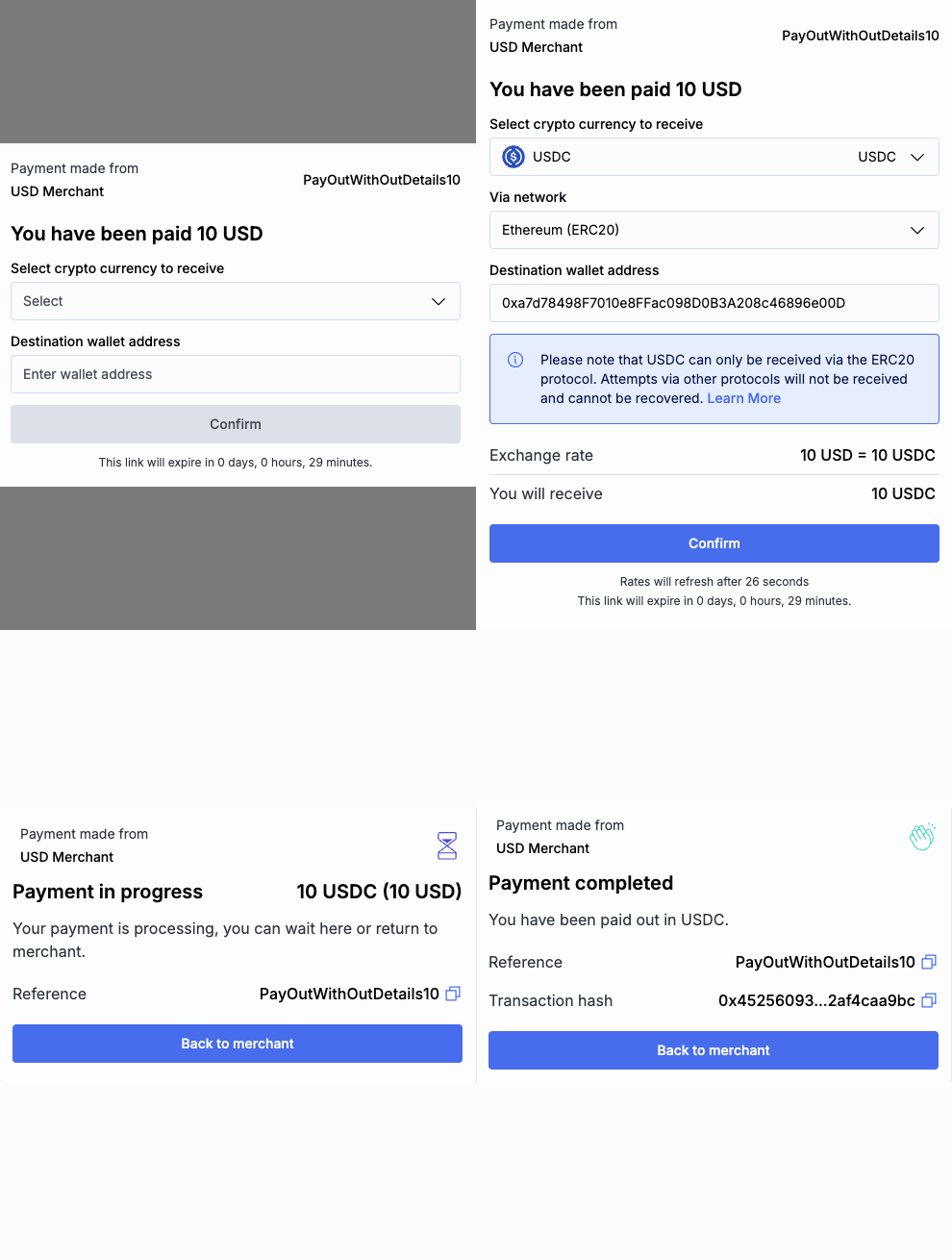
Direct customer to payments: Integrate user payouts using BVNK-hosted payment pages or a custom user interface.
-
Validate a crypto address
If you are integrated directly with the API, it's recommended to validate the crypto address before making a payout. This ensures all required data is present and improves the customer experience. For example, a tag is required for XRP payouts to exchanges to ensure funds are allocated correctly.
Note: If you use the hosted page, the address is validated when the user enters it before processing the payout.
To validate an address, send the PUT /api/v1/pay/validate request with the following body parameters:
{
     "code": "crypto",
     "currency": "USDT",
     "address": "TFsmkjujT9omG5TFrEXYbDocTdjeeHgcrQ",
     "network": "TRON"
}
If the address is invalid, the payout request will fail and you will receive an error similar to the following:
{
    "errorList": [
        {
            "parameter": "payOutInstruction",
            "code": "invalidPayout",
            "message": "Invalid Instruction for Payout"
        }
    ]
}
Create a payout
To create a payout, send the POST /api/v1/pay/summary request with similar body parameters:
{
    "walletId": "a:25022613287255:zmHs0pg:1",
    "type": "OUT",
    "amount": 10,
    "currency": "USD",
    "expiryMinutes": 30,
    "reference": "SQeh6J",
    "returnUrl": "https://your-url-here.com/status",
    "payOutDetails": {
        "code": "crypto",
        "currency": "USDT",
        "network": "ETHEREUM",
        "address": "0x02ae6765C6991813a3EAa86fe63ebBCA1c9EC156",
        "tag": ""
    },
    "customerId": "9420b652-c6e9-4bfe-9425-fc069c6bb710",
    "complianceDetails": {
        "requesterIpAddress": "77.71.188.87",
        "partyDetails": [
            {
                "type": "BENEFICIARY",
                "entityType": "INDIVIDUAL",
                "firstName": "John",
                "lastName": "Mirra",
                "dateOfBirth": "1984-06-30",
                "relationshipType": "THIRD_PARTY",
                "countryCode": "DE"
            }
        ]
    }
}
Instead of passing partyDetails inline with every payment, you can create a reusable contact and reference it by contactId. See Manage contacts for details. You cannot pass both partyDetails and contactId in the same request; doing so will return an error.
Examples:
- Case 1. Your wallet is in USD, and you are going to pay 10 USD, which will be converted to USDT at the current exchange rate. If the exchange rate is 1:0.99, the end user will receive 9.99USDT.
- Case 2. If the displayed
currencyis the same as the funding wallet currency, for example, USDT, the Beneficiary receives the exact amount shown (10 USDT in the example).- Case 3. If the displayed
currencyis the same as thepayOutDetails.currencycurrency, for example, USDT in both fields, the Beneficiary receives the exact amount shown (10 USDT in the example). BVNK will debit your wallet with the calculated exchange amount.
In the successful response, the payout is created, and you receive transaction details:
{
    "uuid": "b9bf94a8-2e2e-4d29-b8d1-5cdf658e6731",
    "merchantDisplayName": "LHV EUR Wallet",
    "walletId": "a:25022613287255:zmHs0pg:1",
    "dateCreated": 1741985003161,
    "expiryDate": 1741986803161,
    "quoteExpiryDate": 1741986803161,
    "acceptanceExpiryDate": 1741985033850,
    "quoteStatus": "ACCEPTED",
    "reference": "test_reference_out_SQeh6J",
    "type": "OUT",
    "subType": "merchantPayOut",
    "status": "PENDING",
    "displayCurrency": {
        "currency": "USD",
        "amount": 10,
        "actual": 0
    },
    "walletCurrency": {
        "currency": "EUR",
        "amount": 9.21,
        "actual": 9.21
    },
    "paidCurrency": {
        "currency": "USDT",
        "amount": 9.997368,
        "actual": 0
    },
    "feeCurrency": {
        "currency": "EUR",
        "amount": 0.09,
        "actual": 0
    },
    "networkFeeCurrency": {
        "currency": "EUR",
        "amount": 1,
        "actual": 0
    },
    "displayRate": {
        "base": "USDT",
        "counter": "USD",
        "rate": 1.000263269292
    },
    "exchangeRate": {
        "base": "EUR",
        "counter": "USDT",
        "rate": 1.085490537307
    },
    "address": {
        "address": "0x02ae6765C6991813a3EAa86fe63ebBCA1c9EC156",
        "tag": "",
        "network": "ETHEREUM",
        "uri": "ethereum:0xdac17f958d2ee523a2206206994597c13d831ec7/transfer?address=0x02ae6765C6991813a3EAa86fe63ebBCA1c9EC156&uint256=9997368",
        "alternatives": []
    },
    "returnUrl": "https://your-url-here.com/status",
    "redirectUrl": "https://pay.sandbox.bvnk.com/payout/b9bf94a8-2e2e-4d29-b8d1-5cdf658e6731",
    "transactions": [],
    "refund": null,
    "refunds": [],
    "currencyOptions": [],
    "flow": "DEFAULT"
}
If there are any errors, the payout won't be created, and you'll have to retry the request with the correct details.
Ensure you set a unique reference for each payout. Otherwise, you will receive an error similar to the following:
{
    "errorList": [
        {
            "parameter": "reference",
            "code": "unique",
            "message": "Duplicate Reference"
        }
    ]
}
Preview a payout
Before you commit to a payout, you can preview it to see the exact conversion rate, fees, and amounts your customer would receive. A dry run calculates the full payment summary without creating a payment or moving any funds.
To run a payment preview, send the POST /api/v1/pay/summary/dry-run request. The request body is identical to the one used to create a payout, and type must be set to OUT.
The response contains the same payment summary you would receive when creating a payout, so you can read the conversion rate and costs directly. In this example, paying 10 USD from a EUR wallet would send 9.997368 USDT to the recipient at the quoted exchange rate.
{
    "walletId": "a:25022613287255:zmHs0pg:1",
    "reference": "SQeh6J",
    "type": "OUT",
    "subType": "merchantPayOut",
    "displayCurrency": {
        "currency": "USD",
        "amount": 10,
        "actual": 0
    },
    "walletCurrency": {
        "currency": "EUR",
        "amount": 9.21,
        "actual": 9.21
    },
    "paidCurrency": {
        "currency": "USDT",
        "amount": 9.997368,
        "actual": 0
    },
    "feeCurrency": {
        "currency": "EUR",
        "amount": 0.09,
        "actual": 0
    },
    "networkFeeCurrency": {
        "currency": "EUR",
        "amount": 1,
        "actual": 0
    },
    "displayRate": {
        "base": "USDT",
        "counter": "USD",
        "rate": 1.000263269292
    },
    "exchangeRate": {
        "base": "EUR",
        "counter": "USDT",
        "rate": 1.085490537307
    }
}
A dry run only calculates the summary, so no payment is created and no funds are moved. When you are ready to make the payout, send the same request body to POST /api/v1/pay/summary.
Integrate advanced payout capabilities
- Estimate and Create Payout
- Two-step Payout
- Direct customer to payments
The Estimate endpoint allows you to retrieve the latest exchange rates, fees and network costs for a crypto payout without creating an actual payout request. This feature enables you to display detailed cost information to your customers before any funds are transferred, thereby enhancing transparency and user trust.
To generate an estimate, provide details such as the payout currencies, desired amount, and network information. You can choose to specify either:
- The amount you want to send (
walletRequiredAmount), or - The amount the recipient should receive (
paidRequiredAmount).
The system will calculate the corresponding value for the other.
-
Create a payout quote by sending the
POST /api/v1/pay/estimaterequest with a similar payload:{"network": "ETHEREUM","complianceDetails": {"requesterIpAddress": "172.16.254.1"},"walletId": "a:24072237783989:Unkx9kW:1","walletCurrency": "USD","paidRequiredAmount": 15,"paidCurrency": "USDT","reference": "REF46730"}You can specify one of the following:
walletRequiredAmount: the amount to send in the wallet's currency, ORpaidRequiredAmount: the amount the recipient should receive.
The system will calculate the corresponding value based on the latest rates and fees.
If the request is successful, you'll receive a
200 OKstatus with the estimated payout details.{"externalId": "4f7768e5-cd82-42c4-80d6-18d84a5b3832","accountId": "4ea1277f-29d7-11ed-84d9-0a878439b77f","walletId": "0da83d78-5c84-475f-a657-9b8b329e9491","customerReference": "REF46730","walletCurrency": "USD","walletRequiredAmount": 15.79,"paidCurrency": "USDT","paidRequiredAmount": 15,"feeCurrency": "USD","feePredictedAmount": 0.16,"networkFeeCurrency": "USD","networkFeePredictedAmount": 1.62,"totalWalletAmount": 15.95,"exchangeRate": 0.949715,"customerId": "9e9bb7cb-f5d4-4f7b-bada-6ad156f3a8d8","paymentExternalId": null,"network": "ETHEREUM"}The exchange rate is typically the most important piece of information that financial companies are after, as it directly affects the cost and value of transactions. Along with the source (
walletCurrency) and destination (paidCurrency) currencies, this information helps you determine the exact conversion dynamics of the payout. -
To update the quote every 30 seconds, use the
externalIdvalue that you received on step 1 to send thePUT api/v1/pay/estimate/{externalId}/updaterequest.You can provide new values in the payload or leave it as is. For the complete list of fields that can be updated, see the endpoint description.
- Refresh the desired paid amount
- Refresh the desired wallet amount
{"paidRequiredAmount": 15,"reference": "REF46730-updated-1"} -
When you are ready to make a payout, turn the quote into a pending payment by sending the
POST /api/v1/pay/estimate/{externalId}/acceptrequest with the following payload. Again, use theexternalIdreceived for the earlier quote.- Individual
- Company
{"customerId": "9e9bb7cb-f5d4-4f7b-bada-6ad156f3a8d8","payOutDetails": {"currency": "USDT","address": "0xc32dEc8Ad273EDeEC81186CBCfce0732AD088fA9","tag": "","network": "ETHEREUM"},"complianceDetails": {"requesterIpAddress": "172.16.254.1","partyDetails": [{"type": "BENEFICIARY","entityType": "INDIVIDUAL","relationshipType": "THIRD_PARTY","firstName": "John","lastName": "Doe","dateOfBirth": "1988-10-12","countryCode": "UK"}]}}Note that on this stage, the payment has not sent yet.
-
Confirm the payout by sending the
PUT /api/v1/pay/{uuid}/confirm/summaryrequest with the paymentuuidreceived fromPOST /api/v1/pay/estimate/{externalId}/accept.
Provide additional party information
You may also need to provide additional party information to comply with the Travel Rule. See the Provide additional party information guide for more details.
Handle errors
If the wallet doesn't have enough funds to cover the payment amount, network and processing fees, the following error is returned. In this case, top up the wallet balance or contact the Solutions team.
{
    "requestId": "fd3b64b97db85a7ebab39d5a1fb20867",
    "errorList": [
        {
            "requestId": null,
            "code": "MER-PAY-2012",
            "parameter": "amount",
            "message": "insufficient funds"
        }
    ]
}
Payout webhook
To receive notifications when the payout status changes, subscribe to the following webhooks: