Try fiat payments in simulator
The sandbox environment provides a consistent simulation experience for pay-ins and payouts across all customer accounts. This ensures predictable behaviour regardless of the underlying partner or integration method.
The simulation also supports testing in cases where a partner's sandbox environment is limited or unavailable. This allows you to validate payment flows and integration logic in a controlled setting before going live.
Note that this functionality is not enabled for all wallets. If you experience any issues when trying to use this simulator, contact Support.
Pay-in simulator
To simulate pay-ins with different currencies and payment methods, in the sandbox environment, send the POST /payment/v2/payins/simulation request with the following payload:
- GBP local
- EUR local
- USD local
- USD SWIFT
{
    "walletId": "acc:23090539331497:bVsk6:0",
    "remittanceInformation": "Invoice INV-2024-00142",
    "method": "FASTER_PAYMENT",
    "amount": 60.50,
    "currency": "GBP",
    "originator": {
        "name": "James Whitfield",
        "bankAccount": {
            "accountNumber": "GB87SYPE04082500000904",
            "accountNumberFormat": "IBAN",
            "bankCode": "SRLGGB2L"
        }
    }
}
| Parameter | Description |
|---|---|
walletId | Your wallet id. |
remittanceInformation | Reference for the payment. |
method | Payment method to be utilised for the pay-in. Optional. If it is not provided, the logic will be based on other dynamically determined attributes and routed for the specific wallet. If provided, use the following methods for each currency: * GBP: FASTER_PAYMENT or SWIFT* EUR: SEPA_CT, SEPA_INST, or SWIFT* USD: ACH, ACH_SAME_DAY, FEDWIRE, CUBIX, or SWIFT |
amount | The amount of the pay-in transaction. |
currency | Currency code (ISO-4217 format) for the pay-in transaction. |
originator.name | Name of the sender of the pay-in. |
originator.bankAccount | Bank account details of the sender of the pay-in. |
originator.bankAccount.accountNumber | Account number of the sender of the pay-in. |
originator.bankAccount.accountNumberFormat | Format type of the bank account number. For example IBAN can be used for SWIFT, and ABA—for local USD rails.Possible values: SCAN, IBAN, SWIFT, ABA, CUBIX |
originator.bankAccount.bankCode | Bank code of the sender of the pay-in. |
The details of a beneficiary are unnecessary for simulating a pay-in because walletId provides specific information for the wallet to be credited.
It is also advisable to subscribe to the pay-in webhook to stay informed about changes to the wallet balance resulting from the simulated pay-in. See Configure webhooks for more information.
Payout simulator
The standard payout flow is shown on the diagram:
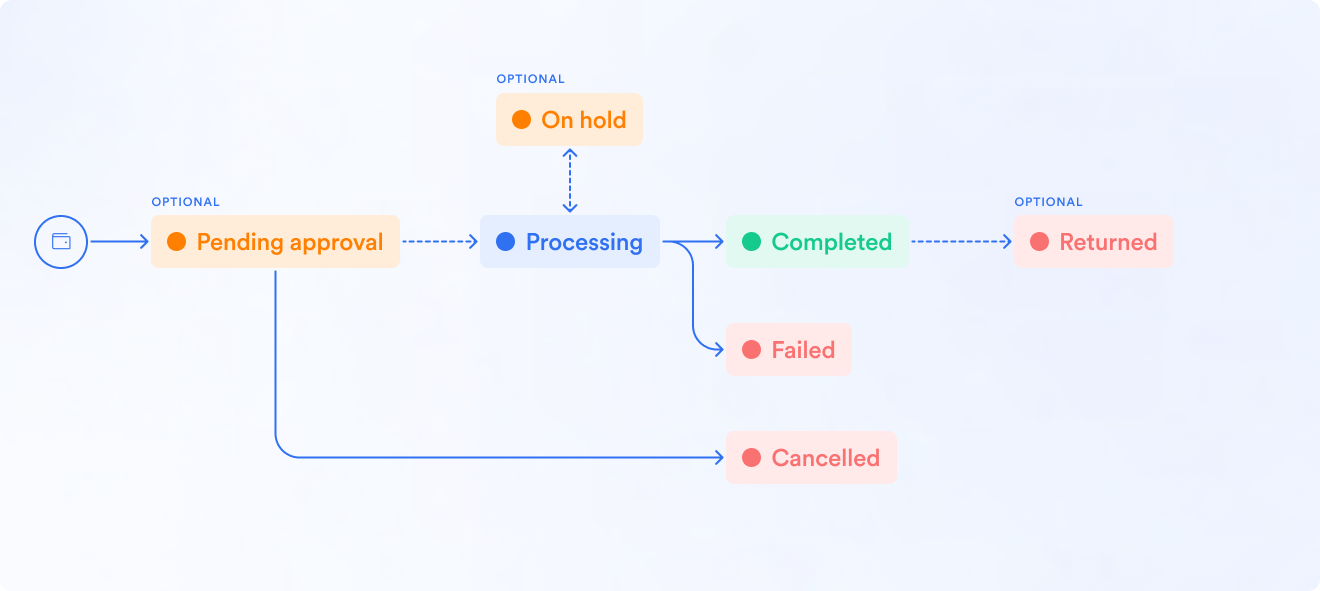
In the BVNK simulator, you can test the following behaviours:
| Flow | Customer Reference Prefix | Description |
|---|---|---|
| NORMAL | Not Applicable | Standard process that does not require a prefix to simulate a payout. |
| FAILED | FAILED | This flow is used to simulate a failure on the banking partner side such as the payment scheme rejecting the payout. |
| RETURN | RETURN | This process simulates a successful payout, followed by a return event. In this scenario, the payout initially appears to be successful, as it has been submitted to the beneficiary's bank. However, the bank ultimately rejects the payment, or the customer decides to reverse the transaction. |
To test the previously mentioned behaviors in the sandbox environment, you can input the customer reference prefix from the flow you want to simulate. If you do not include a customer reference prefix, the system will default to the NORMAL flow as the expected behavior. For instance, if you wish to simulate a failed flow when requesting a payout, the reference should be formatted as FAILED<my-own-reference>.