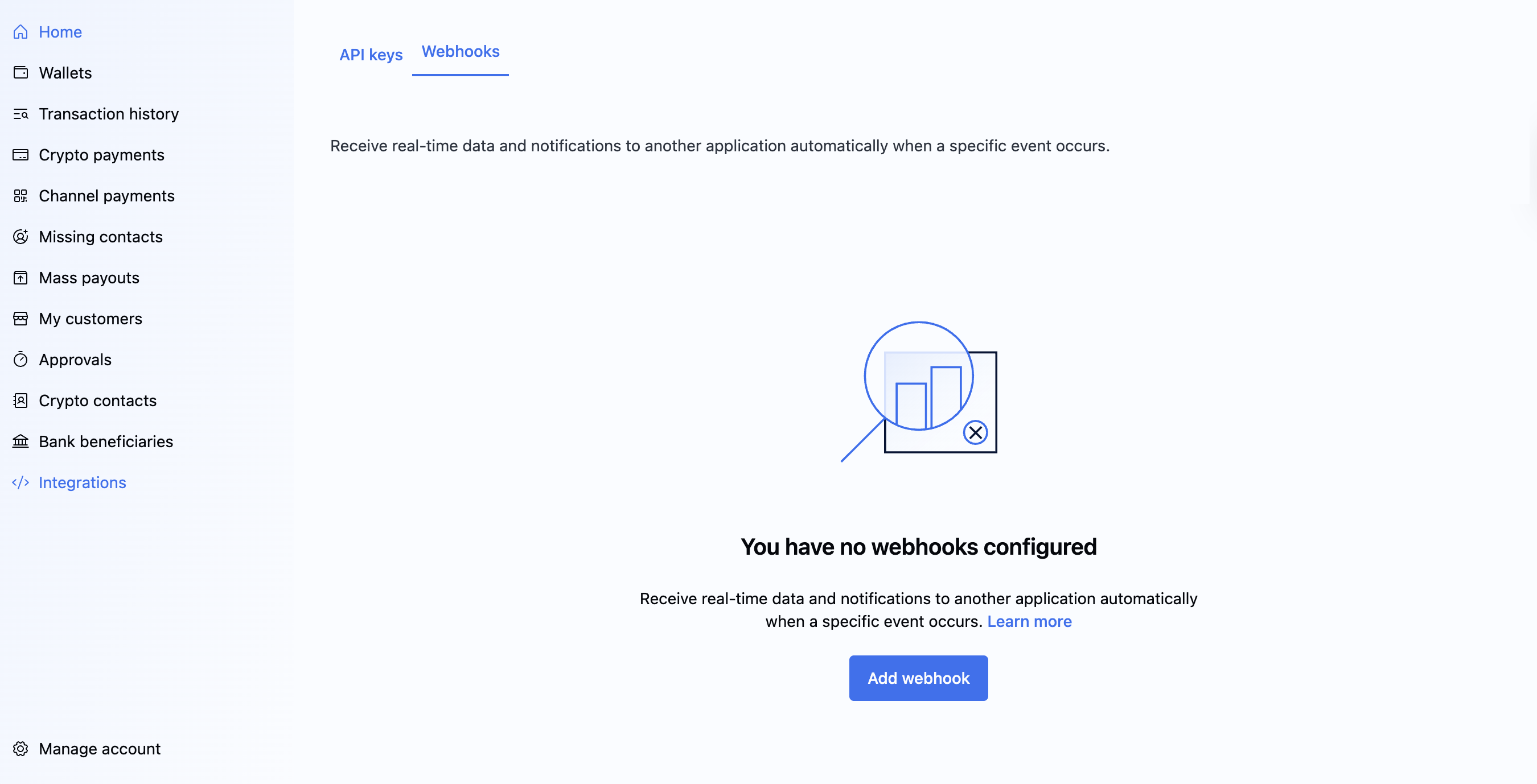
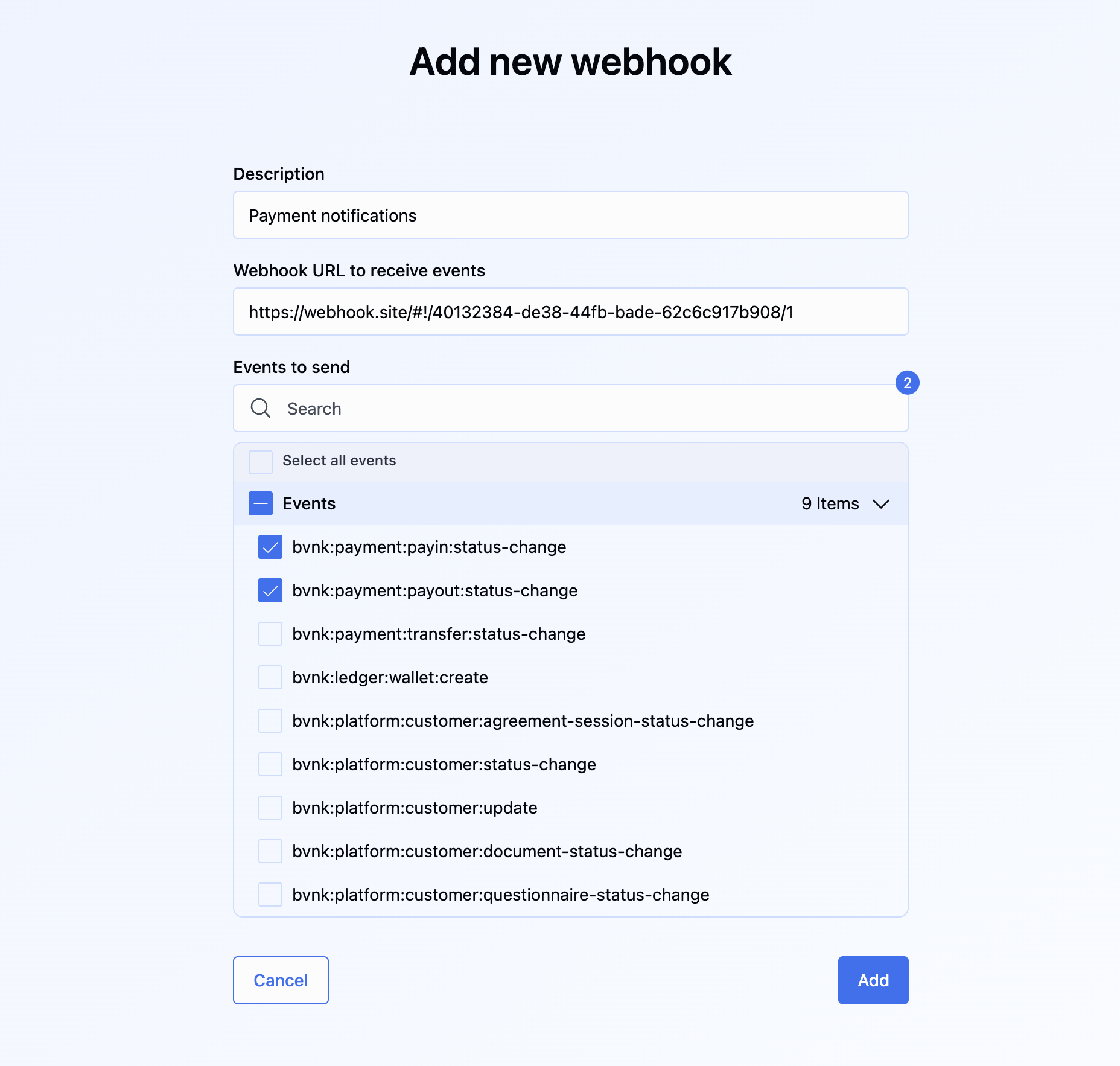
Webhooks provide real-time, automated notifications for changes in your BVNK account.
Configure them for key events, including:
Pay-ins received
Payouts sent
Refunds initiated
Transaction status changes
This capability is essential for automating your workflows. For example, you can instantly credit a customer's wallet when a successful deposit webhook is received, eliminating the need for manual confirmation in the BVNK Portal.
BVNK sends webhooks for changes on transactions and other entities, so it's a good idea to set up a listener in your service to get the most out of our Payments API.
Webhooks are sent as an HTTP POST with Content-Type: application/json containing the payload of the object.
Important notes
Always check the status of the payment on the API after you receive a webhook, as further details may be required, such as the final amount paid for the transaction about which you have been notified.
After you receive the final webhook from BVNK, do not update transactions in your system to prevent duplicate transaction IDs from affecting your customers
BVNK expects the 200 status code upon receipt of a successfully sent webhook.
If your webhook script performs any logic after receiving a webhook, to prevent timeouts, you should return a 200 status code before completing the logic.
If BVNK does not receive a 200 status code, the webhook retry policy will kick in. This includes cases where the endpoint returns a non-2xx status code or fails to respond within the 10-second timeout window. After 10 seconds without a successful response, the delivery attempt is considered failed and will trigger the retry process defined by the webhook policy.
The retry policy adds a delay before each retry, starting with a base delay and increasing it with each retry. The delay grows larger after each attempt, but will not exceed 15 minutes. The system will attempt up to 100 times, and after that, no further retries will occur.
To ensure safe and consistent processing, all webhook events include a unique identifier that receivers should use to implement idempotency. This prevents duplicate event handling if the same webhook is retried multiple times due to timeouts or failed responses. The receiving system should detect repeated event IDs and avoid performing the same business action more than once.
Callback endpoints might occasionally receive the same event more than once. We advise you to guard against duplicate event receipts. One way to do this is to log the events you've processed and then exclude the logged ones from further processing.
The webhook also contains a signature to allow servers to verify the authenticity of the request using a server-side secret key. The key is displayed in the field Public Key when you create the hook. The signature is present in the headers as the x-signature header. See the examples for different languages below.
Java
Python
PHP
JavaScript
C#
Ruby
import javax.crypto.Mac;
import javax.crypto.spec.SecretKeySpec;
import java.util.Arrays;

public class Main {

  public static void main(String[] args) throws Exception {
    // Secret key from webhook configuration (used as string directly, not Base64 decoded)
    String secretKey = "JUL5QkQrpZYwW+Kf03QSrb70CG+ea/j8E/JfslENaXhd0AGBDbAtYYP2MdjkYDqiwjBtrtQXsUIbtAf7IGEGfg==";

    // From X-Signature header
    String signatureBase64 = "VWEtiJu/7dLrq0ZtXS0HbGDPy6Re86oZeTnEEc9mlxg=";

    // Compact JSON payload (no spaces/newlines) - this is what the hook service signs
    String payload = "{\"event\":\"bvnk:ledger:report:ready\",\"eventId\":\"0198a8bb-7d56-79ef-92b2-2aed247c21b4\",\"timestamp\":\"2025-08-14T13:18:36.374620938Z\",\"data\":{\"id\":\"8d942264-e27e-44d9-a048-5ed66ac5129f\",\"url\":\"https://bvnk-staging-reports.s3.eu-west-1.amazonaws.com/transaction/8d942264-e27e-44d9-a048-5ed66ac5129f_7b2f87b9-1335-4b1e-bbeb-6a59ba1dc6df.csv?X-Amz-Algorithm=AWS4-HMAC-SHA256&X-Amz-Date=20250814T131836Z&X-Amz-SignedHeaders=host&X-Amz-Credential=AKIAZP6R7NJUFAGFGMNA%2F20250814%2Feu-west-1%2Fs3%2Faws4_request&X-Amz-Expires=604800&X-Amz-Signature=5c861e552b3e253be28f8e02c818b3c5e00269b9b50b6d4957d5281825d31a67\",\"type\":\"TRANSACTION\",\"status\":\"READY\"}}";

    // Use secret key as UTF-8 bytes directly (as hook service does)
    byte[] secretKeyBytes = secretKey.getBytes("UTF-8");
    SecretKeySpec secretKeySpec = new SecretKeySpec(secretKeyBytes, "HmacSHA256");

    // Initialize HMAC signature verification
    Mac mac = Mac.getInstance("HmacSHA256");
    mac.init(secretKeySpec);

    // Generate signature for the payload
    byte[] computedSignature = mac.doFinal(payload.getBytes());
    String computedSignatureBase64 = java.util.Base64.getEncoder().encodeToString(computedSignature);

    // Decode received signature
    byte[] receivedSignature = java.util.Base64.getDecoder().decode(signatureBase64);

    // Verify signatures match
    boolean verified = Arrays.equals(computedSignature, receivedSignature);

  System.out.println("Expected signature: " + computedSignatureBase64);
  System.out.println("Received signature: " + signatureBase64);
  System.out.println("Signature is valid: " + verified);
}
}
#!/usr/bin/env python3 """ BVNK Webhook Signature Verification - Python This script verifies HMAC-SHA256 signatures from BVNK webhook payloads. """ import hmac import hashlib import base64 defverify_webhook_signature(secret_key, payload, signature_base64): """ Verify HMAC-SHA256 signature for webhook payload Args: secret_key (str): The shared secret from webhook configuration payload (str): The JSON payload as received in webhook signature_base64 (str): The signature from X-Signature header Returns: bool: True if signature is valid, False otherwise """ # Convert secret key to bytes using UTF-8 encoding secret_bytes = secret_key.encode('utf-8') # Convert payload to bytes using UTF-8 encoding payload_bytes = payload.encode('utf-8') # Generate HMAC-SHA256 signature computed_signature = hmac.new( secret_bytes, payload_bytes, hashlib.sha256 ).digest() # Base64 encode the computed signature computed_signature_base64 = base64.b64encode(computed_signature).decode('ascii') # Decode the received signature received_signature = base64.b64decode(signature_base64) # Compare signatures using constant-time comparison return hmac.compare_digest(computed_signature, received_signature) defmain(): # Secret key from webhook configuration (used as string directly) secret_key ="JUL5QkQrpZYwW+Kf03QSrb70CG+ea/j8E/JfslENaXhd0AGBDbAtYYP2MdjkYDqiwjBtrtQXsUIbtAf7IGEGfg==" # From X-Signature header signature_base64 ="VWEtiJu/7dLrq0ZtXS0HbGDPy6Re86oZeTnEEc9mlxg=" # Compact JSON payload (no spaces/newlines) - this is what the hook service signs payload ='{"event":"bvnk:ledger:report:ready","eventId":"0198a8bb-7d56-79ef-92b2-2aed247c21b4","timestamp":"2025-08-14T13:18:36.374620938Z","data":{"id":"8d942264-e27e-44d9-a048-5ed66ac5129f","url":"https://bvnk-staging-reports.s3.eu-west-1.amazonaws.com/transaction/8d942264-e27e-44d9-a048-5ed66ac5129f_7b2f87b9-1335-4b1e-bbeb-6a59ba1dc6df.csv?X-Amz-Algorithm=AWS4-HMAC-SHA256&X-Amz-Date=20250814T131836Z&X-Amz-SignedHeaders=host&X-Amz-Credential=AKIAZP6R7NJUFAGFGMNA%2F20250814%2Feu-west-1%2Fs3%2Faws4_request&X-Amz-Expires=604800&X-Amz-Signature=5c861e552b3e253be28f8e02c818b3c5e00269b9b50b6d4957d5281825d31a67","type":"TRANSACTION","status":"READY"}}' # Verify the signature is_valid = verify_webhook_signature(secret_key, payload, signature_base64) # For debugging - compute expected signature secret_bytes = secret_key.encode('utf-8') payload_bytes = payload.encode('utf-8') computed_signature = hmac.new(secret_bytes, payload_bytes, hashlib.sha256).digest() expected_signature_base64 = base64.b64encode(computed_signature).decode('ascii') print(f"Expected signature: {expected_signature_base64}") print(f"Received signature: {signature_base64}") print(f"Signature is valid: {is_valid}") if __name__ =="__main__": main()
<?php
/**
* BVNK Webhook Signature Verification - PHP
* This script verifies HMAC-SHA256 signatures from BVNK webhook payloads.
*/

/**
* Verify HMAC-SHA256 signature for webhook payload
*
* @param string $secretKey The shared secret from webhook configuration
* @param string $payload The JSON payload as received in webhook
* @param string $signatureBase64 The signature from X-Signature header
* @return bool True if signature is valid, false otherwise
*/
function verifyWebhookSignature($secretKey, $payload, $signatureBase64) {
    // Generate HMAC-SHA256 signature using the secret key as UTF-8 bytes
    $computedSignature = hash_hmac('sha256', $payload, $secretKey, true);

    // Base64 encode the computed signature
    $computedSignatureBase64 = base64_encode($computedSignature);

    // Decode the received signature
    $receivedSignature = base64_decode($signatureBase64);

    // Compare signatures using constant-time comparison
    return hash_equals($computedSignature, $receivedSignature);
}

function main() {
    // Secret key from webhook configuration (used as string directly)
    $secretKey = "JUL5QkQrpZYwW+Kf03QSrb70CG+ea/j8E/JfslENaXhd0AGBDbAtYYP2MdjkYDqiwjBtrtQXsUIbtAf7IGEGfg==";

    // From X-Signature header
    $signatureBase64 = "VWEtiJu/7dLrq0ZtXS0HbGDPy6Re86oZeTnEEc9mlxg=";

    // Compact JSON payload (no spaces/newlines) - this is what the hook service signs
    $payload = '{"event":"bvnk:ledger:report:ready","eventId":"0198a8bb-7d56-79ef-92b2-2aed247c21b4","timestamp":"2025-08-14T13:18:36.374620938Z","data":{"id":"8d942264-e27e-44d9-a048-5ed66ac5129f","url":"https://bvnk-staging-reports.s3.eu-west-1.amazonaws.com/transaction/8d942264-e27e-44d9-a048-5ed66ac5129f_7b2f87b9-1335-4b1e-bbeb-6a59ba1dc6df.csv?X-Amz-Algorithm=AWS4-HMAC-SHA256&X-Amz-Date=20250814T131836Z&X-Amz-SignedHeaders=host&X-Amz-Credential=AKIAZP6R7NJUFAGFGMNA%2F20250814%2Feu-west-1%2Fs3%2Faws4_request&X-Amz-Expires=604800&X-Amz-Signature=5c861e552b3e253be28f8e02c818b3c5e00269b9b50b6d4957d5281825d31a67","type":"TRANSACTION","status":"READY"}}';

    // Verify the signature
    $isValid = verifyWebhookSignature($secretKey, $payload, $signatureBase64);

    // For debugging - compute expected signature
    $computedSignature = hash_hmac('sha256', $payload, $secretKey, true);
    $expectedSignatureBase64 = base64_encode($computedSignature);

    echo "Expected signature: " . $expectedSignatureBase64 . "\n";
    echo "Received signature: " . $signatureBase64 . "\n";
    echo "Signature is valid: " . ($isValid ? "true" : "false") . "\n";
}

// Example usage in a webhook handler
function handleWebhook() {
    // Get the payload from POST body
    $payload = file_get_contents('php://input');

    // Get the signature from headers
    $signatureBase64 = $_SERVER['HTTP_X_SIGNATURE'] ?? '';

    // Your secret key from webhook configuration
    $secretKey = "YOUR_SECRET_KEY_HERE";

    // Verify the signature
    if (verifyWebhookSignature($secretKey, $payload, $signatureBase64)) {
        // Signature is valid - process the webhook
        $data = json_decode($payload, true);
        echo "Webhook verified and processed successfully\n";
        // Process your webhook data here
    } else {
        // Invalid signature
        http_response_code(401);
        echo "Invalid webhook signature\n";
    }
}

// Run the test
main();
?>
const crypto =require('crypto'); /** * Verify HMAC-SHA256 signature for webhook payload * * @param{string}secretKey - The shared secret from webhook configuration * @param{string}payload - The JSON payload as received in webhook * @param{string}signatureBase64 - The signature from X-Signature header * @returns{boolean} True if signature is valid, false otherwise */ functionverifyWebhookSignature(secretKey, payload, signatureBase64){ // Generate HMAC-SHA256 signature using the secret key as UTF-8 bytes const computedSignature = crypto .createHmac('sha256', secretKey) .update(payload,'utf8') .digest(); // Base64 encode the computed signature const computedSignatureBase64 = computedSignature.toString('base64'); // Decode the received signature const receivedSignature =Buffer.from(signatureBase64,'base64'); // Compare signatures using constant-time comparison return crypto.timingSafeEqual(computedSignature, receivedSignature); } functionmain(){ // Secret key from webhook configuration (used as string directly) const secretKey ="JUL5QkQrpZYwW+Kf03QSrb70CG+ea/j8E/JfslENaXhd0AGBDbAtYYP2MdjkYDqiwjBtrtQXsUIbtAf7IGEGfg=="; // From X-Signature header const signatureBase64 ="VWEtiJu/7dLrq0ZtXS0HbGDPy6Re86oZeTnEEc9mlxg="; // Compact JSON payload (no spaces/newlines) - this is what the hook service signs const payload ='{"event":"bvnk:ledger:report:ready","eventId":"0198a8bb-7d56-79ef-92b2-2aed247c21b4","timestamp":"2025-08-14T13:18:36.374620938Z","data":{"id":"8d942264-e27e-44d9-a048-5ed66ac5129f","url":"https://bvnk-staging-reports.s3.eu-west-1.amazonaws.com/transaction/8d942264-e27e-44d9-a048-5ed66ac5129f_7b2f87b9-1335-4b1e-bbeb-6a59ba1dc6df.csv?X-Amz-Algorithm=AWS4-HMAC-SHA256&X-Amz-Date=20250814T131836Z&X-Amz-SignedHeaders=host&X-Amz-Credential=AKIAZP6R7NJUFAGFGMNA%2F20250814%2Feu-west-1%2Fs3%2Faws4_request&X-Amz-Expires=604800&X-Amz-Signature=5c861e552b3e253be28f8e02c818b3c5e00269b9b50b6d4957d5281825d31a67","type":"TRANSACTION","status":"READY"}}'; // Verify the signature const isValid =verifyWebhookSignature(secretKey, payload, signatureBase64); // For debugging - compute expected signature const computedSignature = crypto .createHmac('sha256', secretKey) .update(payload,'utf8') .digest('base64'); console.log(`Expected signature: ${computedSignature}`); console.log(`Received signature: ${signatureBase64}`); console.log(`Signature is valid: ${isValid}`); } // Example Express.js webhook handler functionsetupExpressWebhookHandler(app){ const express =require('express'); // Middleware to get raw body for signature verification app.use('/webhook', express.raw({type:'application/json'})); app.post('/webhook',(req, res)=>{ const payload = req.body.toString('utf8'); const signatureBase64 = req.headers['x-signature']; // Your secret key from webhook configuration const secretKey ="YOUR_SECRET_KEY_HERE"; if(verifyWebhookSignature(secretKey, payload, signatureBase64)){ // Signature is valid - process the webhook const data =JSON.parse(payload); console.log('Webhook verified and processed successfully'); // Process your webhook data here res.status(200).send('OK'); }else{ // Invalid signature console.log('Invalid webhook signature'); res.status(401).send('Invalid signature'); } }); } // Browser version (if you need client-side verification - not recommended for security) asyncfunctionverifyWebhookSignatureBrowser(secretKey, payload, signatureBase64){ // Convert secret key to ArrayBuffer const secretKeyBuffer =newTextEncoder().encode(secretKey); // Import the key for HMAC const key =await crypto.subtle.importKey( 'raw', secretKeyBuffer, {name:'HMAC',hash:'SHA-256'}, false, ['sign','verify'] ); // Convert payload to ArrayBuffer const payloadBuffer =newTextEncoder().encode(payload); // Generate signature const signatureBuffer =await crypto.subtle.sign('HMAC', key, payloadBuffer); // Convert to base64 const computedSignatureBase64 =btoa(String.fromCharCode(...newUint8Array(signatureBuffer))); // Decode received signature const receivedSignature =Uint8Array.from(atob(signatureBase64),c=> c.charCodeAt(0)); const computedSignature =newUint8Array(signatureBuffer); // Compare signatures if(receivedSignature.length!== computedSignature.length){ returnfalse; } let result =0; for(let i =0; i < receivedSignature.length; i++){ result |= receivedSignature[i]^ computedSignature[i]; } return result ===0; } // Run the test if this file is executed directly if(require.main=== module){ main(); } module.exports={ verifyWebhookSignature, verifyWebhookSignatureBrowser, setupExpressWebhookHandler };
using System;
using System.Security.Cryptography;
using System.Text;

namespace BvnkWebhookVerification
{
    public class WebhookVerifier
    {
        /// Verify HMAC-SHA256 signature for webhook payload
        public static bool VerifyWebhookSignature(string secretKey, string payload, string signatureBase64)
        {
            try
            {
                // Convert secret key to bytes using UTF-8 encoding
                byte[] secretKeyBytes = Encoding.UTF8.GetBytes(secretKey);

                // Convert payload to bytes using UTF-8 encoding
                byte[] payloadBytes = Encoding.UTF8.GetBytes(payload);

                // Generate HMAC-SHA256 signature
                using (var hmac = new HMACSHA256(secretKeyBytes))
                {
                    byte[] computedSignature = hmac.ComputeHash(payloadBytes);

                    // Base64 encode the computed signature
                    string computedSignatureBase64 = Convert.ToBase64String(computedSignature);

                    // Decode the received signature
                    byte[] receivedSignature = Convert.FromBase64String(signatureBase64);

                    // Compare signatures using constant-time comparison
                    return CryptographicOperations.FixedTimeEquals(computedSignature, receivedSignature);
                }
            }
            catch (Exception)
            {
                return false;
            }
        }

        /// <summary>
        /// Alternative signature verification for older .NET versions without CryptographicOperations
        /// </summary>
        public static bool VerifyWebhookSignatureLegacy(string secretKey, string payload, string signatureBase64)
        {
            try
            {
                byte[] secretKeyBytes = Encoding.UTF8.GetBytes(secretKey);
                byte[] payloadBytes = Encoding.UTF8.GetBytes(payload);

                using (var hmac = new HMACSHA256(secretKeyBytes))
                {
                    byte[] computedSignature = hmac.ComputeHash(payloadBytes);
                    string computedSignatureBase64 = Convert.ToBase64String(computedSignature);

                    // Simple string comparison (less secure but works for older .NET)
                    return string.Equals(computedSignatureBase64, signatureBase64, StringComparison.Ordinal);
                }
            }
            catch (Exception)
            {
                return false;
            }
        }
    }

    class Program
    {
        static void Main(string[] args)
        {
            // Secret key from webhook configuration (used as string directly)
            string secretKey = "JUL5QkQrpZYwW+Kf03QSrb70CG+ea/j8E/JfslENaXhd0AGBDbAtYYP2MdjkYDqiwjBtrtQXsUIbtAf7IGEGfg==";

            // From X-Signature header
            string signatureBase64 = "VWEtiJu/7dLrq0ZtXS0HbGDPy6Re86oZeTnEEc9mlxg=";

            // Compact JSON payload (no spaces/newlines) - this is what the hook service signs
            string payload = @"{""event"":""bvnk:ledger:report:ready"",""eventId"":""0198a8bb-7d56-79ef-92b2-2aed247c21b4"",""timestamp"":""2025-08-14T13:18:36.374620938Z"",""data"":{""id"":""8d942264-e27e-44d9-a048-5ed66ac5129f"",""url"":""https://bvnk-staging-reports.s3.eu-west-1.amazonaws.com/transaction/8d942264-e27e-44d9-a048-5ed66ac5129f_7b2f87b9-1335-4b1e-bbeb-6a59ba1dc6df.csv?X-Amz-Algorithm=AWS4-HMAC-SHA256&X-Amz-Date=20250814T131836Z&X-Amz-SignedHeaders=host&X-Amz-Credential=AKIAZP6R7NJUFAGFGMNA%2F20250814%2Feu-west-1%2Fs3%2Faws4_request&X-Amz-Expires=604800&X-Amz-Signature=5c861e552b3e253be28f8e02c818b3c5e00269b9b50b6d4957d5281825d31a67"",""type"":""TRANSACTION"",""status"":""READY""}}";

            // Verify the signature
            bool isValid = WebhookVerifier.VerifyWebhookSignature(secretKey, payload, signatureBase64);

            // For debugging - compute expected signature
            byte[] secretKeyBytes = Encoding.UTF8.GetBytes(secretKey);
            byte[] payloadBytes = Encoding.UTF8.GetBytes(payload);

            using (var hmac = new HMACSHA256(secretKeyBytes))
            {
                byte[] computedSignature = hmac.ComputeHash(payloadBytes);
                string expectedSignatureBase64 = Convert.ToBase64String(computedSignature);

                Console.WriteLine($"Expected signature: {expectedSignatureBase64}");
                Console.WriteLine($"Received signature: {signatureBase64}");
                Console.WriteLine($"Signature is valid: {isValid}");
            }
        }
    }
}
require 'openssl'
require 'base64'

class WebhookVerifier
  ##
  # Verify HMAC-SHA256 signature for webhook payload
  #
  # @param secret_key [String] The shared secret from webhook configuration
  # @param payload [String] The JSON payload as received in webhook
  # @param signature_base64 [String] The signature from X-Signature header
  # @return [Boolean] True if signature is valid, false otherwise
  def self.verify_webhook_signature(secret_key, payload, signature_base64)
    # Generate HMAC-SHA256 signature using the secret key as UTF-8 bytes
    computed_signature = OpenSSL::HMAC.digest('SHA256', secret_key, payload)

    # Base64 encode the computed signature
    computed_signature_base64 = Base64.strict_encode64(computed_signature)

    # Decode the received signature
    received_signature = Base64.strict_decode64(signature_base64)

    # Compare signatures using constant-time comparison
    OpenSSL.secure_compare(computed_signature, received_signature)
  rescue StandardError
    false
  end

  ##
  # Alternative signature verification for older Ruby versions without secure_compare
  def self.verify_webhook_signature_legacy(secret_key, payload, signature_base64)
    computed_signature = OpenSSL::HMAC.digest('SHA256', secret_key, payload)
    computed_signature_base64 = Base64.strict_encode64(computed_signature)

    # Simple string comparison (less secure but works for older Ruby)
    computed_signature_base64 == signature_base64
  rescue StandardError
    false
  end
end

def main
  # Secret key from webhook configuration (used as string directly)
  secret_key = 'JUL5QkQrpZYwW+Kf03QSrb70CG+ea/j8E/JfslENaXhd0AGBDbAtYYP2MdjkYDqiwjBtrtQXsUIbtAf7IGEGfg=='

  # From X-Signature header
  signature_base64 = 'VWEtiJu/7dLrq0ZtXS0HbGDPy6Re86oZeTnEEc9mlxg='

  # Compact JSON payload (no spaces/newlines) - this is what the hook service signs
  payload = '{"event":"bvnk:ledger:report:ready","eventId":"0198a8bb-7d56-79ef-92b2-2aed247c21b4","timestamp":"2025-08-14T13:18:36.374620938Z","data":{"id":"8d942264-e27e-44d9-a048-5ed66ac5129f","url":"https://bvnk-staging-reports.s3.eu-west-1.amazonaws.com/transaction/8d942264-e27e-44d9-a048-5ed66ac5129f_7b2f87b9-1335-4b1e-bbeb-6a59ba1dc6df.csv?X-Amz-Algorithm=AWS4-HMAC-SHA256&X-Amz-Date=20250814T131836Z&X-Amz-SignedHeaders=host&X-Amz-Credential=AKIAZP6R7NJUFAGFGMNA%2F20250814%2Feu-west-1%2Fs3%2Faws4_request&X-Amz-Expires=604800&X-Amz-Signature=5c861e552b3e253be28f8e02c818b3c5e00269b9b50b6d4957d5281825d31a67","type":"TRANSACTION","status":"READY"}}'

  # Verify the signature
  is_valid = WebhookVerifier.verify_webhook_signature(secret_key, payload, signature_base64)

  # For debugging - compute expected signature
  computed_signature = OpenSSL::HMAC.digest('SHA256', secret_key, payload)
  expected_signature_base64 = Base64.strict_encode64(computed_signature)

  puts "Expected signature: #{expected_signature_base64}"
  puts "Received signature: #{signature_base64}"
  puts "Signature is valid: #{is_valid}"
end

# Example Sinatra webhook handler
def setup_sinatra_webhook_handler
  require 'sinatra'
  require 'json'

  post '/webhook' do
    # Read the raw body
    request.body.rewind
    payload = request.body.read

    # Get the signature from headers
    signature_base64 = request.env['HTTP_X_SIGNATURE'] || ''

    # Your secret key from webhook configuration
    secret_key = 'YOUR_SECRET_KEY_HERE'

    if WebhookVerifier.verify_webhook_signature(secret_key, payload, signature_base64)
      # Signature is valid - process the webhook
      data = JSON.parse(payload)
      puts 'Webhook verified and processed successfully'
      # Process your webhook data here
      status 200
      'OK'
    else
      # Invalid signature
      puts 'Invalid webhook signature'
      status 401
      'Invalid signature'
    end
  end
end

# Example Rails controller
class WebhooksController < ApplicationController
  skip_before_action :verify_authenticity_token

  def handle_webhook
    payload = request.raw_post
    signature_base64 = request.headers['X-Signature'] || ''

    # Your secret key from webhook configuration
    secret_key = Rails.application.credentials.webhook_secret_key

    if WebhookVerifier.verify_webhook_signature(secret_key, payload, signature_base64)
      # Signature is valid - process the webhook
      data = JSON.parse(payload)
      Rails.logger.info 'Webhook verified and processed successfully'
      # Process your webhook data here
      head :ok
    else
      # Invalid signature
      Rails.logger.error 'Invalid webhook signature'
      head :unauthorized
    end
  rescue JSON::ParserError
    Rails.logger.error 'Invalid JSON in webhook payload'
    head :bad_request
  rescue StandardError => e
    Rails.logger.error "Webhook processing error: #{e.message}"
    head :internal_server_error
  end
end

# Run the test if this file is executed directly
main if __FILE__ == $PROGRAM_NAME
Make sure you do not parse your HTTP request into an object and then serialize it.
Instead, provide the webhook raw payload as a string.
The signature will be available in the x-signature header of the webhook. Every new webhook has a unique x-signature header value. Make sure you compare the hash to the correct header.