# Set up wallets
> :::info Wallets API v.2
This is a new wallets flow, which is recommended for all new integrations.
:::info Wallets API v.2
This is a new wallets flow, which is recommended for all new integrations.
If you already have an existing integration with [Wallets API v.1](../../api-explorer/endpoints/create-customer-wallet), you can continue using it. For the Wallets v.1 guide see [Create a wallet](../creating-your-first-wallet).
:::
On BVNK, you can create and manage both crypto and fiat wallets through the Portal or API. Specify a customer's ID and reference to create wallets for them; otherwise, the wallet is created for your own account.
When created, a wallet passes the following stages:
```mermaid
%%{init: {'theme': 'base', 'themeVariables': {'primaryColor': '#ffffff', 'lineColor': '#3071F2', 'primaryTextColor': '#344054', 'fontSize': '15px'}, 'flowchart': {'padding': 15}}}%%
flowchart LR
A["1. Retrieve wallet profiles*
GET#nbsp;/ledger/v2/wallets/profiles"] --> B["2. Create a wallet
POST#nbsp;/ledger/v2/wallets"]
B --> C["3. Receive ID in response; wait for wallet activation
#quot;status#quot;: #quot;INACTIVE#quot;"]
C --> D["4. Receive status webhook
ledger:v2:wallet:status-change"]
style A fill:#e5eeff80,stroke:#e5eeff80,color:#344054
style B fill:#e5eeff80,stroke:#e5eeff80,color:#344054
style C fill:#e5eeff80,stroke:#e5eeff80,color:#344054
style D fill:#e5eeff80,stroke:#e5eeff80,color:#344054
```
\* For fiat wallets only. For crypto wallets, start with step 2: [Create a wallet](#create-a-wallet).
## Retrieve wallet profiles
:::warning Required only for fiat wallets.
When creating crypto wallets, start with the [Create a wallet](#create-a-wallet) step.
:::
Before adding a wallet to your account, you must assign a wallet profile to it. The wallet profile is a template that defines the currency codes and payment methods available for a wallet.
To list the existing wallet profiles, send the [`GET /ledger/v2/wallets/profiles`](../../api-explorer/endpoints/wallet-profiles-2/) request. Send the GET /ledger/v2/wallets/profiles request to list wallet profiles. Use the optional `q` parameter to filter results with [Lucene query syntax](https://lucene.apache.org/core/2_9_4/queryparsersyntax.html), such as `currency:USD`, `method:SWIFT`, or `customerId:550e8400-e29b-41d4-a716-446655440000 AND currency:USD`.
Each profile in the response has an `id` to use as `profileId` when [creating a wallet](#create-a-wallet). Available currencies and methods vary based on your account and jurisdiction.
## Create a wallet
To create a wallet, do the following:
To create a fiat wallet with an [assigned wallet profile](#create-a-wallet), send the [`POST /ledger/v2/wallets`](../../api-explorer/endpoints/ledger-wallet-create-v-2) request with a JSON body like the following. Use the `id` from [`GET /ledger/v2/wallets/profiles`](../../api-explorer/endpoints/wallet-profiles-2/) as `profileId`.
```json
{
"currency": "USD",
"name": "USD SWIFT",
"profileId": "fiat:usd:141d6bae"
}
```
In the successful response, you get the details of the new fiat wallet:
```json Example Response for fiat wallet
{
"id": "a:25060945127830:rTgK3wN:1",
"name": "USD SWIFT",
"status": "INACTIVE",
"balance": {
"amount": 0.00,
"currency": "USD"
},
"paymentInstruments": [],
"createdAt": "2025-06-09T14:05:12.830Z",
"updatedAt": "2025-06-09T14:05:12.830Z"
}
```
```json
{
"customerId": "3fa85f64-5717-4562-b3fc-2c963f66afa6",
"currency": "USD",
"name": "USD ACH",
"profileId": "fiat:usd:520e259f"
}
```
In the successful response, you get the details of the new fiat wallet:
```json Example Response for fiat wallet
{
"id": "a:25060945127830:rTgK3wN:1",
"name": "USD SWIFT",
"customer": { // Only for customers' wallets
"id": "a1f84b6c-9e23-4d17-b590-7c4a83de2f10",
"name": "Meridian Healthcare"
},
"status": "INACTIVE",
"balance": {
"amount": 0.00,
"currency": "USD"
},
"paymentInstruments": [],
"createdAt": "2025-06-09T14:05:12.830Z",
"updatedAt": "2025-06-09T14:05:12.830Z"
}
```
To create a crypto wallet, send the [`POST /ledger/v2/wallets`](../../api-explorer/endpoints/ledger-wallet-create-v-2) request with a JSON body like the following.
```json
{
"currency": "USDT",
"name": "USDT Treasury"
}
```
In the successful response, you get the details of the new crypto wallet:
```json Example Response for crypto wallet
{
"id": "a:25060945183207:vLpR8mC:1",
"name": "USDT Treasury",
"status": "INACTIVE",
"balance": {
"amount": 0.000000,
"currency": "USDT"
},
"paymentInstruments": [],
"createdAt": "2025-06-09T14:06:23.207Z",
"updatedAt": "2025-06-09T14:06:23.207Z"
}
```
```json
{
"customerId": "3fa85f64-5717-4562-b3fc-2c963f66afa6",
"currency": "USDT",
"name": "USDT Payments"
}
```
In the successful response, you get the details of the new crypto wallet:
```json Example Response for crypto wallet
{
"id": "a:25060945183207:vLpR8mC:1",
"name": "USDT Treasury",
"customer": { // Only for customers' wallets
"id": "c7a91d3e-48f2-4b76-a835-2e6d09f1c4b8",
"name": "Greenfield Logistics"
},
"status": "INACTIVE",
"balance": {
"amount": 0.000000,
"currency": "USDT"
},
"paymentInstruments": [],
"createdAt": "2025-06-09T14:06:23.207Z",
"updatedAt": "2025-06-09T14:06:23.207Z"
}
```
The `id` of the created wallet is returned in a `Location` response header, for example `https://api.sandbox.bvnk.com/ledger/v2/wallets/{id}`.
Wallets are not created immediately: a new wallet often appears as `INACTIVE` first, and then automatically transitions to an `ACTIVE` state. The activation process can take several minutes. Poll [`GET /ledger/v2/wallets/{id}`](../../api-explorer/endpoints/ledger-wallet-read-v-2) or use the webhooks rather than creating duplicate wallets if activation is slow.
When the wallet is created, the `paymentInstruments` array is empty and the `balance` is `0`. The `paymentInstruments` array will be populated with the payment details after the wallet is activated and the [webhook is received](#receive-status-webhook).
The wallet can also have the `TERMINATED` status. This means the wallet can no longer be used, and that state is final; BVNK can never reactivate it. All operations, including receiving pay-ins, sending payouts, and currency conversions, are blocked for the terminated wallets. You can only access its transaction history. To learn how to terminate a wallet, see the [Manage wallets](../manage-wallet) guide.
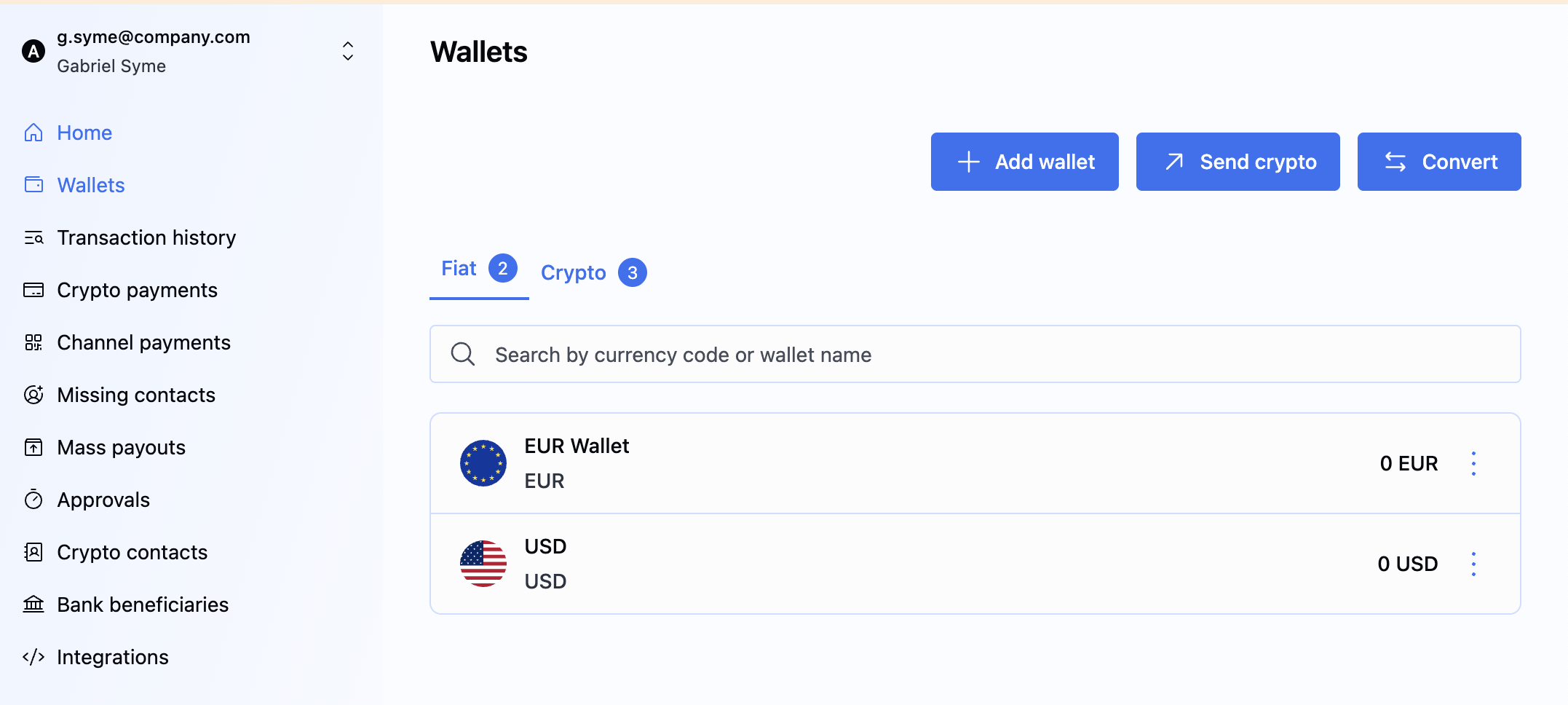
1. On the BVNK Portal, go to **Wallets** and click **Add Wallet**.
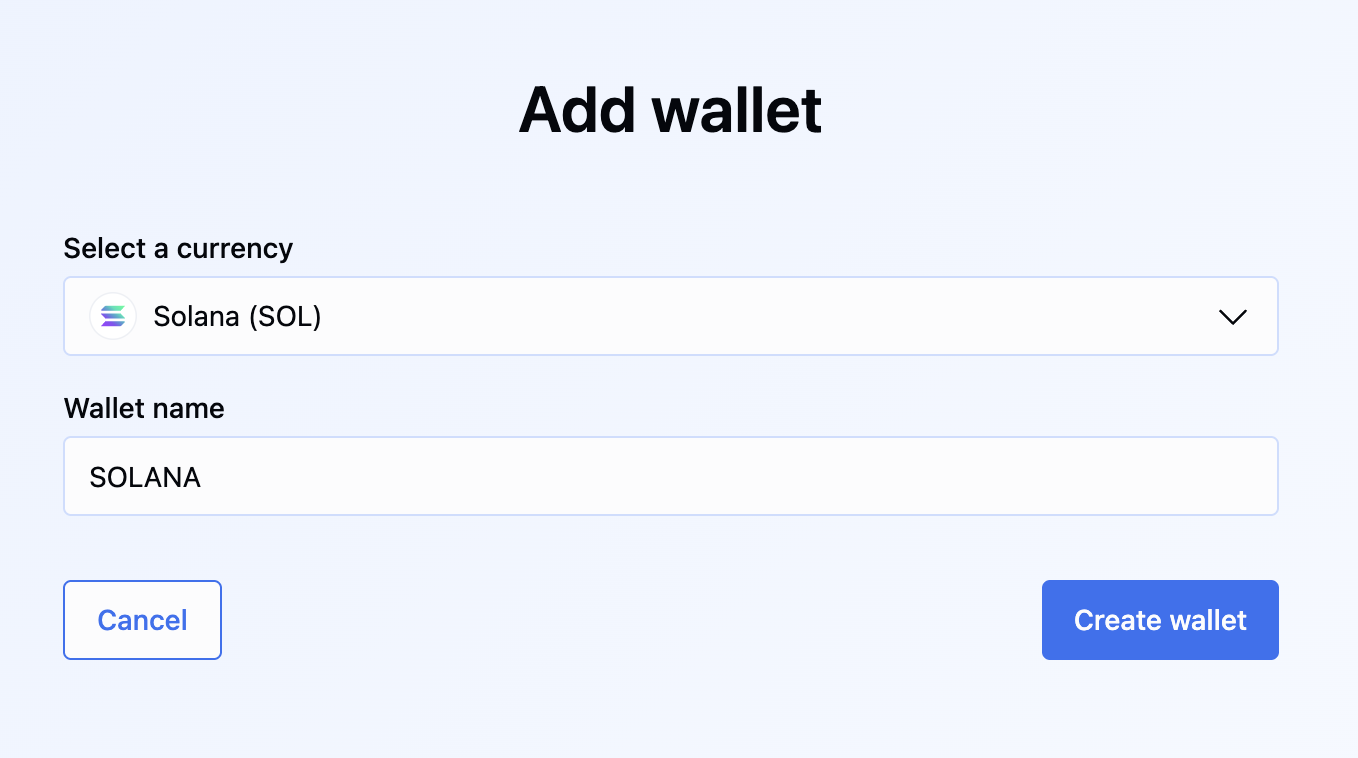
2. Select the currency, insert a unique name for this wallet and click **Create Wallet**.
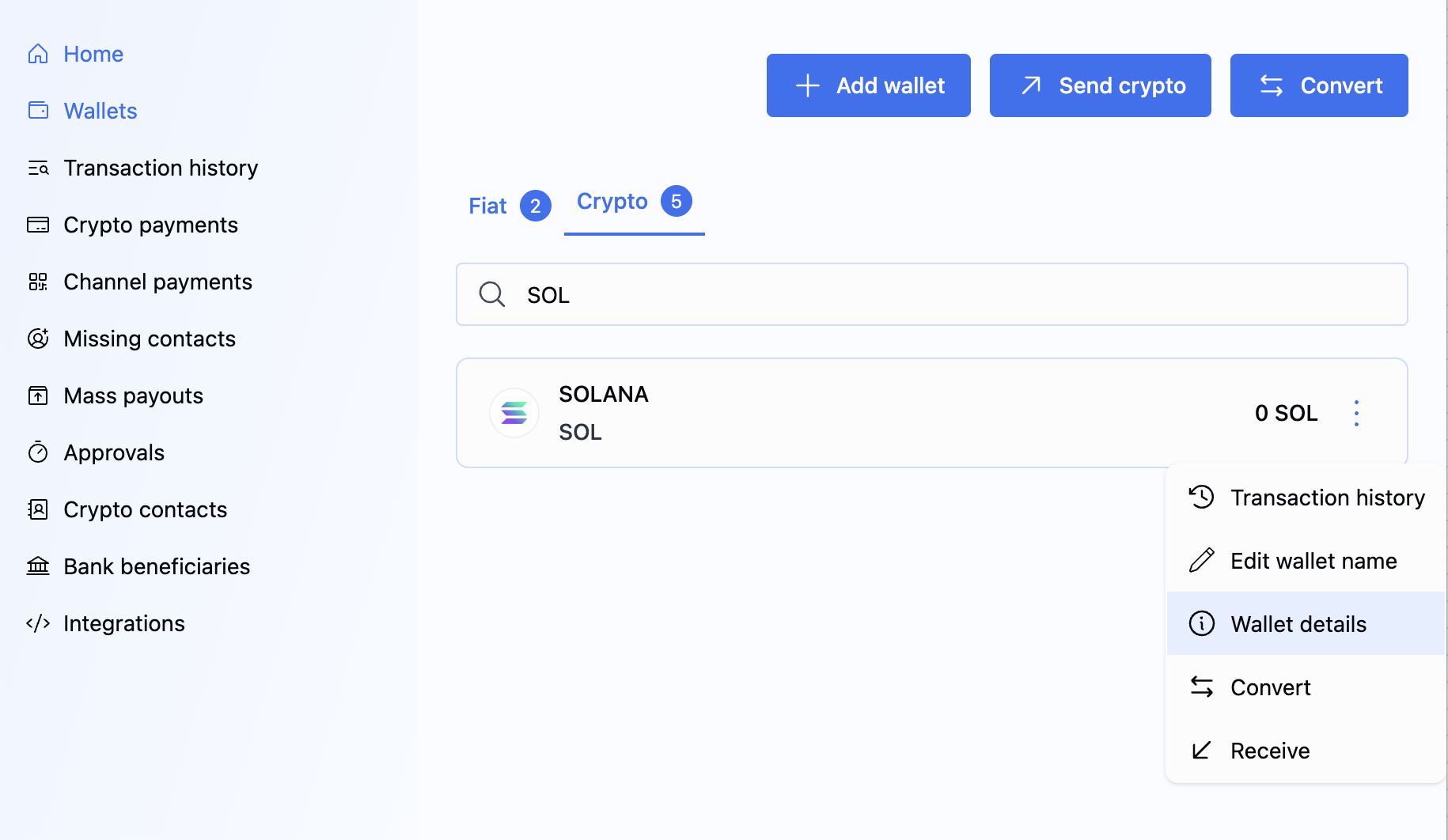
The newly created wallet appears on the portal. If you click on the wallet, you can see the actions you can take on it.
:::info
When you get portal access to your production BVNK account, fiat wallets will be automatically assigned to you during onboarding.
:::
## Manage wallets
To manage the wallet lifecycle, use [`POST /ledger/v2/wallets/{walletId}/actions`](../../api-explorer/endpoints/ledger-wallet-execute-action).
You can perform the following actions:
- `TERMINATE`: Permanently terminates the wallet. This action is irreversible. The wallet balance must be **zero** (0) before termination.
For fiat wallets, the associated Virtual Account is closed. Crypto wallets do not use this mechanism.
- `BLOCK`: Temporarily blocks the wallet and prevents activity.
- `UNBLOCK`: Removes a previously applied block from the wallet.
In the payload, specify the `action` value and provide a non-empty `comment` explaining the reason for the action. You can add the following comments from the list:
- `COMPLIANCE`
- `OPERATION`
- `OFFBOARDING`
- `CLIENT_REQUEST`
- `OTHER`
```json Request
{
"action": "BLOCK",
"comment": "COMPLIANCE"
}
```
```json Request
{
"action": "UNBLOCK",
"comment": "COMPLIANCE"
}
```
```json Request
{
"action": "TERMINATE",
"comment": "CLIENT_REQUEST"
}
```
If the request is successful, the endpoint returns `204 No Content`.
Possible error scenarios include:
- `400 Bad Request`: For example, this occurs if you attempt to run `TERMINATE` when the wallet has a non-zero balance.
- `409 Conflict`: For example, this occurs if you attempt to run `BLOCK` or `UNBLOCK` on a wallet that is already terminated.
## Retrieve wallets
Use the wallet endpoints to monitor status and balances. `GET /ledger/v2/wallets` returns summaries only and does not include `paymentInstruments`. Full payment instrument and account details are returned by `GET /ledger/v2/wallets/{id}` for a single wallet.
:::note Balance decimal precision
Fiat wallet balances use **2 decimal places** (e.g. `48250.75`), while crypto wallet balances use **6 decimal places** (e.g. `14727.556775`).
:::
### All wallets
To list all wallets, send the [`GET /ledger/v2/wallets`](../../api-explorer/endpoints/ledger-wallet-list-v-2) request.
The list response returns wallet summaries without `paymentInstruments`. For payment instruments and full account details, call [`GET /ledger/v2/wallets/{id}`](../../api-explorer/endpoints/ledger-wallet-read-v-2) with that wallet's `{id}`.
### Specific wallet
To retrieve wallet details by its unique identifier, send the [`GET /ledger/v2/wallets/{id}`](../../api-explorer/endpoints/ledger-wallet-read-v-2) request with the `{id}` specified in the path.
In the response, you receive full wallet details. For fiat wallets, the `paymentInstruments` array contains the bank account details. For crypto wallets, `paymentInstruments` is an empty array. To receive crypto deposits into the wallet, generate a blockchain address using [Payment Links](../../use-cases/stablecoin-payments-for-platforms/get-payment) or [Channels](../../use-cases/stablecoin-payments-for-platforms/create-channel).
### Customer's wallets
To retrieve wallets for a specific customer, send the [`GET /ledger/v2/wallets`](../../api-explorer/endpoints/ledger-wallet-list-v-2) request and filter by customer ID using `q` and the Lucene syntax, for example:
```http
GET /ledger/v2/wallets?q=customerId:550e8400-e29b-41d4-a716-446655440000 AND status:ACTIVE
```
The above request returns all **active** wallets for your customer with ID `550e8400-e29b-41d4-a716-446655440000`.
The response uses the same paginated format as the [All wallets](#all-wallets) list, filtered to that customer's wallets only.
## Receive status webhook
To get notified each time a wallet's status changes, listen to the [wallet notification](../../api-explorer/bvnk-webhooks/ledger-wallet-status-change-v-2).
---
**What's next?**
Now that you have created a wallet, you can start sending and receiving payments.
- See the available [use cases](find-your-usecase.mdx) to select the one that best suits your needs.
- Configure a designated wallet for [customer fees](charge-customer-fees.mdx).